FairShield Lookup
On this page9
The lookup checks a player's Discord account against FairShield's list of cheat servers. Staff pick a player, press one button, and read whether that account is in such servers, and in which.
Look up an online player
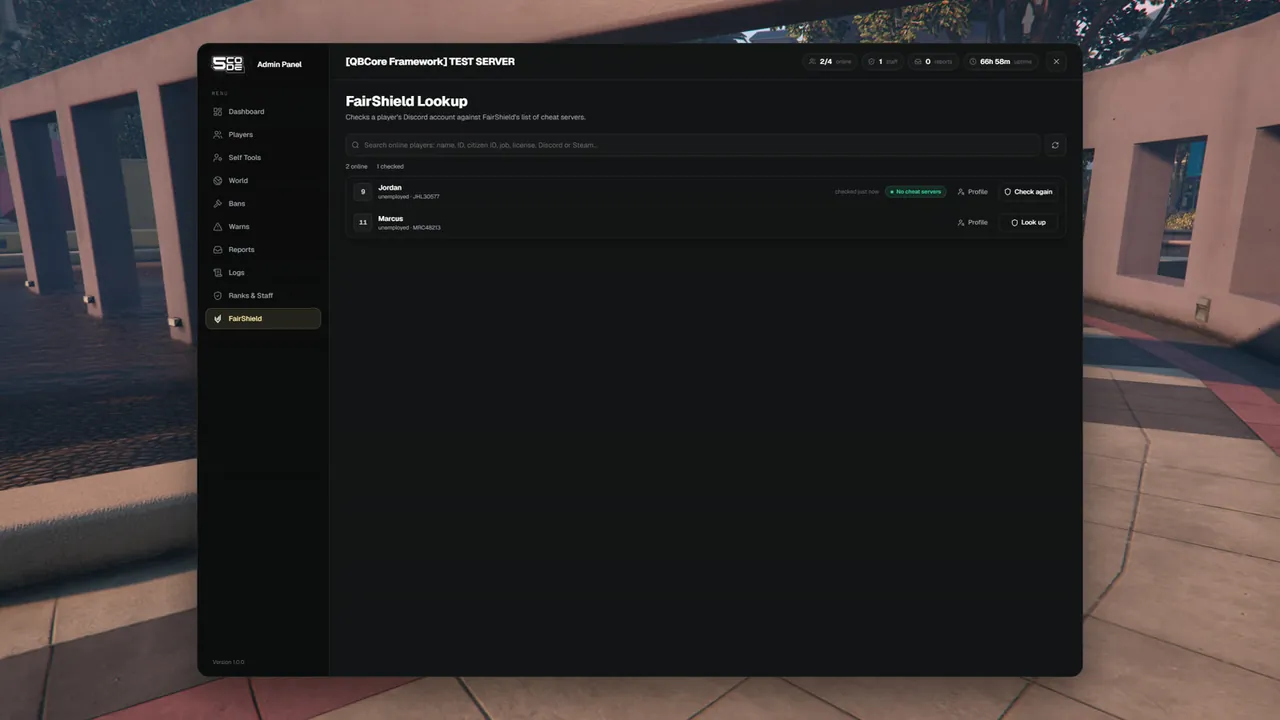
- Open FairShield in the menu. The page lists everybody who is online.
- Find the player. The search takes a name, a server ID, a citizen ID, a job, a license, a Discord ID or a Steam ID.
- Press Look up on their row.
- Read the answer on the same row.
Nobody has to type an identifier. The server reads the player's Discord account itself.
What the answer means
| You see | Meaning |
|---|---|
| A green badge No cheat servers | The Discord account linked to this player was not found in any cheat server |
| A red badge such as 2 cheat servers, and a card "Found in 2 cheat servers" | That Discord account is in those servers. The card lists their names: up to 12, then "+3 more" |
checked 2m ago | When you made the check |
| No Discord in place of the button | This player has no Discord linked to FiveM. There is nothing to look up |
Every card with a hit ends with the line "Checked by the Discord account linked to this player."
- The button changes to Check again after the first check.
- Profile opens the player's profile. Back to FairShield lookup brings you back, and the answers are still there.
- The line above the list sums it up, for example
24 online · 6 checked · 1 in cheat servers · 3 without Discord.
Look up from a profile
The same check is on every player profile, also for a player who is offline.
- Open Players and pick the player. For an offline player, switch the list to Offline and search.
- In the FairShield part of the profile, press Look up on FairShield.
- Read the card under the button.
| Card | Meaning |
|---|---|
| "Not found in any cheat server" | No hit for that Discord account |
| "Found in 2 cheat servers" with the names | A hit |
| "No Discord linked" | "FairShield checks by Discord account, and this player has none linked to FiveM. There is nothing to look up." The button is greyed out |
| "Not configured" | No API key is set on this server |
For an offline player the panel uses the Discord account it saved at the player's last visit.
Players without Discord
The lookup works with the Discord account a player has linked to FiveM. A player without one cannot be checked.
| Where | What staff see |
|---|---|
| The FairShield page | No Discord in place of the Look up button, and the player is counted under "without Discord" |
| A profile | The card "No Discord linked" |
| As a message | "This player has no Discord linked, so FairShield cannot check them." |
When it is not configured
| Where | What staff see |
|---|---|
| The FairShield page | The card Lookup not configured: "Get an API key in the FairShield Discord and add it to config_server.lua to turn the lookup on." |
| A profile | The card Not configured: "FairShield lookup is not configured. Ask the server owner for an API key in the FairShield Discord." |
The page also shows the link Open FairShield Discord when the owner has set DiscordInvite.
The lookup counts as configured when Enabled = true and ApiKey holds your key in
config_server.lua. Put your own key in place of [YOUR FAIRSHIELD API KEY]. The steps are on
FairShield. The key stays on the server: staff never see it.
Messages
| Message | Why | What to do |
|---|---|---|
| "FairShield did not accept the API key. Tell the server owner." | The key is wrong or no longer valid | The owner checks ApiKey in config_server.lua |
| "FairShield refused the request. Tell the server owner." | FairShield did not allow this lookup | The owner asks in the FairShield Discord |
| "Too many FairShield lookups right now. Wait a moment and try again." | Many lookups in a short time | Wait a moment, then press the button again |
| "FairShield lookup failed. Try again later." | No usable answer came back | Try again later |
| "That player is no longer online." | The player left before you pressed the button | Look them up from their offline profile |
| "You do not have permission to do that." | Your rank lacks a permission below | Ask for the permission |
Permissions
| Name in the rank editor | Key | Needed for |
|---|---|---|
| FairShield lookup | fairshield.lookup | The FairShield page and the button on a profile |
| Open the panel | panel.open | Opening a profile |
| Offline players | player.offline | Looking up a player who is offline |
Settings
All of them are in config_server.lua under ConfigServer.FairShield. See FairShield.
| Key | What it changes |
|---|---|
Enabled | Switches the lookup on |
ApiKey | Your key: [YOUR FAIRSHIELD API KEY] |
CacheTtl | How many seconds the server remembers an answer. Check again inside that time shows the same answer |
DiscordInvite | The link behind Open FairShield Discord |
Limits
- The lookup checks the Discord account only. No linked Discord means no check.
- A player who joins with another Discord account is a different lookup.
- The FairShield page lists online players only. Offline players are checked from their profile.
- An offline player can be checked only when the panel saw them join at least once with Discord linked.
- There is no "check everybody" button. Staff look up one player at a time.
- Every lookup that is sent is in the Logs as
/lookup.