Self Tools
On this page9
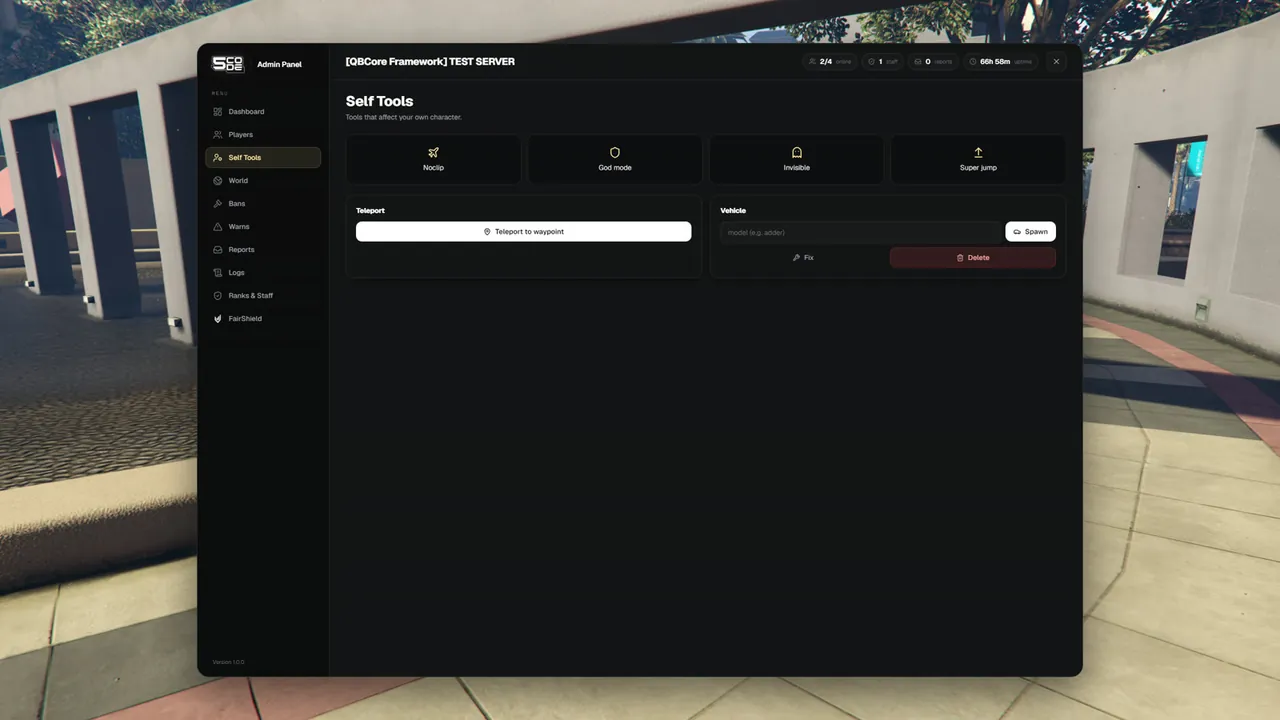
Tools that change your own character or your own vehicle: noclip, god mode, invisible, teleports, vehicles, and names above the heads of other players.
Where they are
| Place | What is there |
|---|---|
| Full panel, Self Tools page | The four switches, Teleport to waypoint, and the vehicle card (Spawn, Fix, Delete) |
Quick menu (/adminmenu), Me tab | The four switches with ON / Off, Heal me, Revive me, and all teleports |
| Quick menu, Tools tab | Your vehicle, names and IDs, players on the map, Copy my position |
The quick menu has every tool. The Self Tools page has the most used ones. See Quick Menu.
Using it
- Open the quick menu with
/adminmenu, or the full panel with/adminand click Self Tools. - Press a switch to turn it on. Press it again to turn it off.
- In the quick menu a switch that is on is gold and says ON.
All tools
| Tool | What it does | Where | Permission |
|---|---|---|---|
| Noclip | You fly through the map | Page and quick menu | Noclip & super jump (self.noclip) |
| God mode | You take no damage | Page and quick menu | God mode (self.god) |
| Invisible | Other players do not see your character | Page and quick menu | Invisible (self.invisible) |
| Super jump | You jump very high | Page and quick menu | Noclip & super jump (self.noclip) |
| Heal me | Full health and full armour | Quick menu | Heal (player.heal) |
| Revive me | Stands you up with full health | Quick menu | Revive (player.revive) |
| To waypoint | Moves you to the waypoint on your map | Page and quick menu | Teleport (self.teleport) |
| Go back | Moves you to where you stood before your last teleport | Quick menu | Teleport (self.teleport) |
| Saved places | One button per place from Config.Places | Quick menu | Teleport (self.teleport) |
| Sit room | Moves you to the sit room | Quick menu | Run sits (reports.sit) |
| Spawn | Spawns a vehicle by its model name and puts you in the driver seat | Page and quick menu | Vehicles (self.vehicle) |
| Fix vehicle | Repairs and cleans the vehicle you sit in | Page and quick menu | Vehicles (self.vehicle) |
| Flip vehicle | Puts a vehicle back on its wheels | Quick menu | Vehicles (self.vehicle) |
| Delete vehicle | Deletes the vehicle you sit in | Page and quick menu | Vehicles (self.vehicle) |
| Names and IDs | Shows "[ID] name" above the heads of the players around you | Quick menu | See names, IDs and blips (self.names) |
| Players on the map | Shows every player as a blip on your map, named "[ID] name" | Quick menu | See names, IDs and blips (self.names) |
| Copy my position | Copies where you stand, ready to paste into config.lua | Quick menu | None |
How the tools behave
| Situation | Result |
|---|---|
| Noclip is on | Move with W A S D in the direction you look, Space goes up, Ctrl goes down, Shift is fast (default game keys). You take no damage and pass through everything |
| Noclip in the driver seat | The vehicle flies with you |
| To waypoint with no waypoint set | "Set a waypoint on the map first." |
| To waypoint in the driver seat | The vehicle moves with you |
| Go back | Works after To waypoint, a saved place, the sit room, or Go to on a player. It keeps one place only. With none: "There is no place to go back to." |
| Spawn | The vehicle appears where you stand, with the plate ADMIN. On the Self Tools page an empty field spawns an adder |
| Spawn with a wrong name | "Unknown vehicle model." |
| Fix or Delete on foot | "You are not in a vehicle." |
| Flip on foot | Flips the nearest overturned vehicle within 5 metres that no player drives. With none: "No overturned vehicle near you." |
| Names and IDs | Shows players within about 50 metres. Only you see the names |
| Players on the map | The blips move every few seconds. Only you see them |
| Copy my position | Copies a line like vector4(195.17, -933.77, 29.70, 144.50) |
| You respawn or get another model | Your switches stay on |
| You leave the server, or the resource restarts | Everything is off again |
Hidden staff
A staff member counts as hidden while they are invisible, in noclip, or spectating a player.
| Who looks | Sees the hidden staff member |
|---|---|
| Staff of a lower or the same rank | No. No name above the head, no blip on the map, not in the Nearby list |
| Staff of a higher rank | Yes |
| A super-admin | Yes |
So staff of a lower rank cannot use names or the map to find a higher rank who is watching somebody.
The hidden rule covers names, blips and Nearby. The Players page still lists everybody who is online.
Spectating
Spectate is started on a player. See Player Actions. While you spectate:
- Your own character is hidden and takes no damage.
- The quick menu shows "Spectating [name]" at the bottom, with a Stop button.
- When you stop, you are put back where you stood.
Permissions
| Permission | Key | Allows |
|---|---|---|
| Noclip & super jump | self.noclip | Noclip and Super jump |
| God mode | self.god | God mode |
| Invisible | self.invisible | Invisible |
| Teleport | self.teleport | To waypoint, Go back and the saved places |
| Vehicles | self.vehicle | Spawn, Fix, Flip and Delete |
| See names, IDs and blips | self.names | Names and IDs, Players on the map |
The Self Tools page is in the menu when the rank has one of the first five.
Settings
| Key | What it changes here | Page |
|---|---|---|
Config.Places | The saved places in the quick menu | Quick Menu & Places |
Config.SitRoom | Where Sit room leads. false removes the button | Tickets & Sits |
Config.MiniMenuCommand, Config.MiniMenuKey | The command and the optional key of the quick menu | General |
Limits
- The Self Tools page does not show which switches are on. The quick menu does.
- Go back remembers one place. A second teleport replaces it.
- Spawning a vehicle does not delete the vehicle you had before.
- If your game does not answer within a few seconds, the panel says: "The game did not answer. Try again."
- Every use of a self tool is written to the Logs, except Copy my position.