Sits
On this page9
A sit brings the people of a ticket, and you, into a private room to talk. When it ends, everybody goes back to the exact spot they stood on, or to jail if you decide so.
Before you start
- You are handling the ticket: it is under My claims on the Reports page.
- Your rank has Run sits (
reports.sit). - The players you want to talk to are on the ticket. Add them with Add player. See Tickets.
Run a sit
- Open your ticket.
- Click a person and press Heads-up. It sends them a private notice. This step is optional.
- Press Bring everyone. For one person only, click them and press To sit room.
- Leave Take me there too switched on if you want to go along, then press Bring.
- Talk to them in the room.
- Press End sit and choose what happens to each person.
The heads-up
The heads-up is a message only that player sees. It does not move them. The text is filled in for you and you can change it:
A staff member needs you for a report. You will be brought to a sit shortly — please stop somewhere safe.
The player gets it as a notice and as a chat line from Staff (ticket #12). The person's row then shows Heads-up sent 2m ago.
What happens when you bring people
- The position of each person is saved first.
- They are moved to the sit room, into a private copy of the world. Nobody else can see them or walk in.
- Each player reads: "Staff brought you to a sit to talk to you."
- The ticket shows sit running. The Sit room bar shows how long it runs and who is in the room, for example
Running 5m · 2 in the room with you.
The buttons
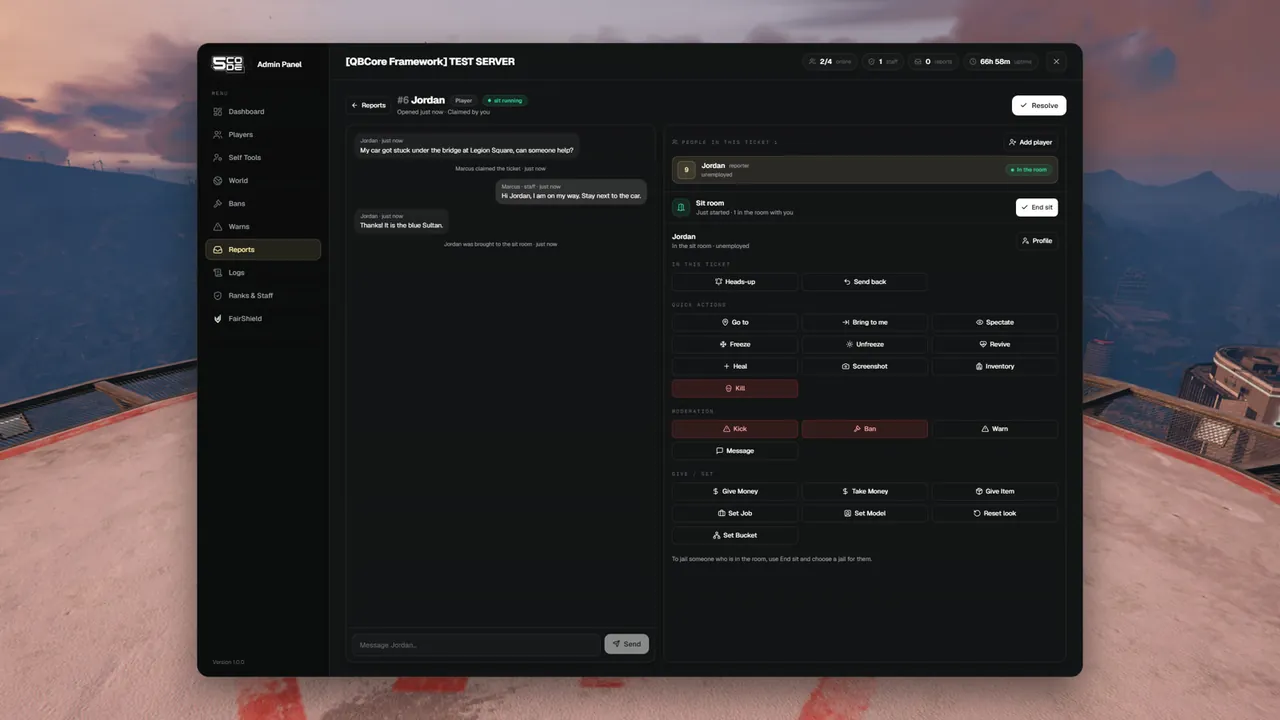
| Button | Where | What it does |
|---|---|---|
| Heads-up | On a person | Sends the private notice |
| Bring everyone | Sit room bar | Brings every online person on the ticket. While a sit runs it reads Bring 2 more |
| To sit room | On a person | Brings only that person |
| Go there | Sit room bar | Takes you into the room when you did not go along |
| Send back | On a person in the room | Returns that person to their spot. The sit goes on |
| End sit | Sit room bar | Ends the sit for everybody |
End the sit
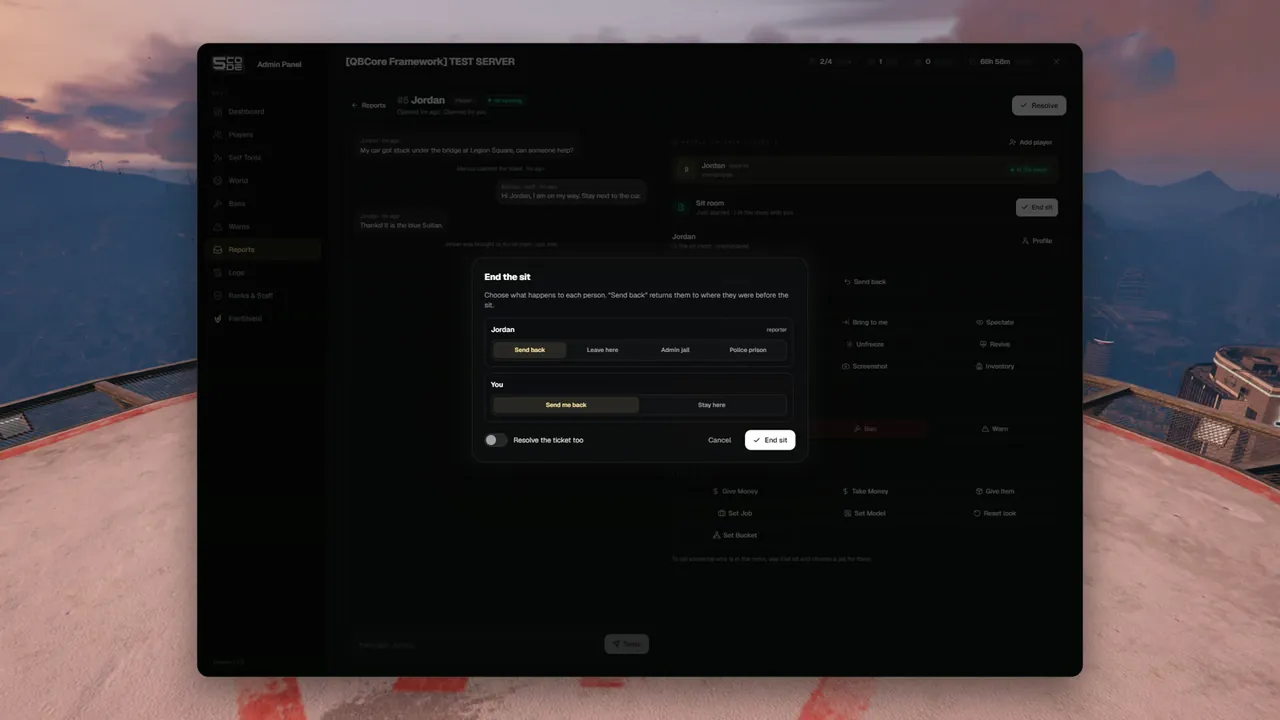
End sit opens a list of everybody in the room. Choose one outcome per person.
| Choice | What happens to the person |
|---|---|
| Send back | They return to where they were before the sit |
| Leave here | They stay standing at the sit room spot and leave the private room. Other players can see them again |
| Admin jail | They go to the admin jail for the Minutes and Reason you type. After the jail they return to where they were before the sit |
| Police prison | They are handed to the prison script of your server for the Minutes and Reason you type |
- For yourself you choose Send me back or Stay here.
- Switch on Resolve the ticket too to close the ticket in the same step. The button then reads End sit and resolve.
- The two jail choices need the Jail / release permission. Police prison only shows when a prison script is connected. See Jail.
- If a jail cannot be done, the person is sent back instead. Nobody stays behind in the room.
What "back" means
When a person is brought, the panel saves three things: the exact spot they stand on, the direction they face, and the dimension (routing bucket) they are in. Send back puts all three back.
- The spot is saved once. Bringing the same person again never overwrites it.
- It works the same for the staff member who goes along.
When somebody leaves the server
| What happens | Result |
|---|---|
| A player in the room leaves the server | They stay on the list as Left the server. If they come back while the sit runs, they are put into the room again |
| The sit ends while a player is away | Your choice for them is kept. The list says "left the server, applied when they return". It is done when their character is back in the world |
| A player chosen for Send back returns and spawns somewhere else | They are left where they are. Only a player who comes in at the sit room is moved |
| The staff member running the sit leaves the server | The sit ends at once and everybody is sent back. The ticket gets the line "The staff member left: the sit was ended and everybody was returned." |
| That staff member stays away for 5 minutes | The ticket goes back to waiting and any staff member can claim it. See Tickets |
| The resource or the server restarts | Every sit ends and everybody is sent back, now or when they come in. The ticket gets the line "The admin panel was restarted: the sit was ended and everybody was returned." |
Rules
| Rule | What staff read |
|---|---|
| Only the staff member handling the ticket runs its sit | "Only the staff member handling this ticket can do that." |
| No sit room is set | "No sit room is set on this server." |
| A player can be in one sit at a time | "That player is already in a sit." |
| A jailed player is not brought | "That player is in jail." |
| You cannot bring a player with the same or a higher rank | "That player has the same or a higher rank than you." |
| A player on the loading or character screen is not brought | "That player is still loading in. Try again in a moment." |
| Nobody could be moved | "Nobody could be brought." |
| You cannot go along while you spectate | "Stop spectating first." |
| A player in the room is jailed through End sit, not with the Jail button | "This player is in a sit room. Jail them when you end the sit." |
| While a sit runs the ticket cannot be unclaimed, taken over or resolved | "End the sit first." |
Every step is written into the ticket conversation, for example <name> was brought to the sit room,
<name> was sent back or <name> was sent to admin jail for 10 min. Only staff see these lines. The player who opened the ticket does not.
Permissions
| Name in the rank editor | Key | Needed for |
|---|---|---|
| Handle tickets | reports.manage | Claiming the ticket first |
| Run sits | reports.sit | Add player, heads-up, bring, send back, end sit |
| Private message | player.dm | The Heads-up button |
| Jail / release | player.jail | The jail choices in End sit |
Settings
| Key | Default | What it changes |
|---|---|---|
Config.SitRoom | vec4(-75.0, -818.6, 326.18, 0.0) (roof of the Maze Bank tower) | The spot people are brought to. false switches sits off |
One spot is enough: every sit gets its own private room at that spot. How to pick your own place is on Tickets & Sits.
Limits
- One sit per ticket, and one sit per person at a time.
- Only players who are online with a character in the world can be brought.
- A sit does not outlive the staff member who runs it: it ends when they leave the server.
- The Sit room place in the quick menu takes you to the spot in the normal world. To join a running sit, use Go there on the ticket.
- Each sit uses its own routing bucket, in the range 20000 to 29999. Keep other scripts off that range.