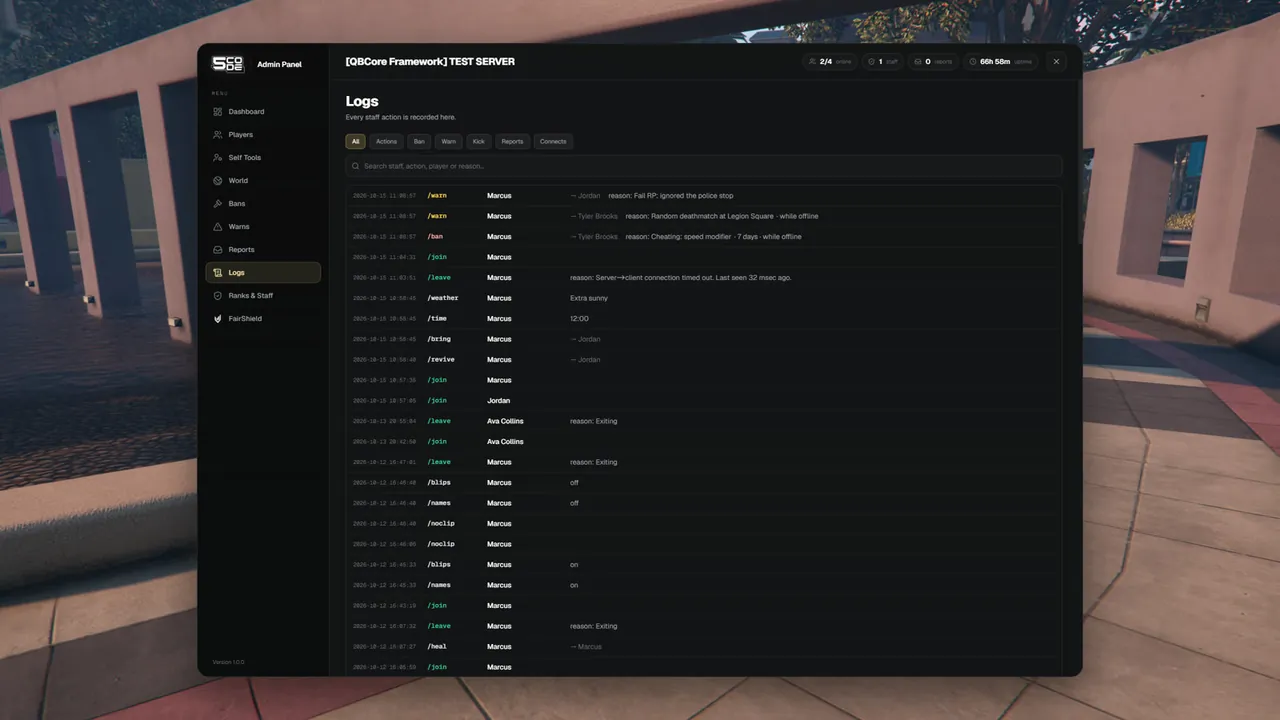
Everything staff do with the panel is written down. The Logs page lets you read it, filter it and
search it. Each category can also be sent to a Discord channel.
Every staff action with its tag, who did it, to whom, and the details.
Open Logs in the menu. The newest entry is on top. Each line has up to five parts:
Part
Example
Meaning
Time
2026-10-11 18:42:07
Date and time
Tag
/ban
What was done. The colour shows the category
Who
the staff member's name
Who did it. For joins and leaves it is the player
Target
→ and the player's name
The player it was done to. Empty when there is no target
Details
reason: RDM · 2 days
What exactly happened. Empty when there is nothing more to say
The target is shown by the name the panel saw last. A player the panel has never seen on the
server is shown by a short form of their identifier.
A long reason is cut to fit the line. Rest the mouse on it to read it in full.
Entries that the panel made by itself show Console as the name. Examples: a jail time that ran
out, a sit that ended because the staff member left, or a ticket that went back to waiting because
its staff member left the server.
The reason and the length. An offline ban adds "while offline"
reason: RDM · 2 days
/warn, /kick, /kickall
The reason
reason: spam in the chat
/unban, /unwarn, /banevade
The number of the ban or the warning
ban #12
/freeze, /freezeall
"frozen" or "unfrozen"
frozen
/givemoney, /takemoney
The amount and the account
$5,000 bank
/giveitem
The amount and the item
2 × water
/setjob
The job and the grade
police · grade 2
/setmodel, /car
The model name
mp_m_freemode_01
/bucket
The bucket number
bucket 5
/jail, /unjail
The reason, the length and which jail. A jail that ran out adds "time was up"
reason: RDM · 10 minutes · admin jail
/weather, /time
The new weather or time
Rain
/blackout, /pvp, /names, /blips
"on" or "off"
on
/clear, /cleararea
How many vehicles and NPCs were removed
4 vehicles · 2 NPCs
/announce
The message
/place
The name of the saved place
Legion Square
/rank, /delrank, /setstaff
The name of the rank
rank: Moderator
Ticket and sit tags
The ticket number. Some add one more fact: the category of a new ticket, how many people were brought, or why the panel gave a ticket back or ended a sit
ticket #12 · staff member left
/leave
The reason the game gave for the leave
A tag that is not in this table has no details, for example /goto or /heal.
The buttons All, Actions, Ban, Warn, Kick, Reports, Connects
Show one category only
The search box ("Search staff, action, player or reason…")
Finds a staff name, a tag such as /unban, the target's name or a part of their identifier, and text from the details: a reason, an item, a job, an amount, a ticket number
Both work together: pick Ban and type a staff name to see the bans of one staff member.
Every log entry can also be posted to Discord. You set one webhook per category in config_server.lua:
bans, warns, kicks, actions, reports and connects. Use your own address in place of [YOUR WEBHOOK URL].
Rule
Result
A category has its own webhook
Its entries go to that channel
The webhook of a category is empty
Its entries go to the actions webhook
connects is empty
Joins and leaves are not sent to Discord at all
actions is empty too
Nothing is sent for the categories without their own webhook
The Discord message carries the staff member, the target and the details. It names the target by
their identifier, not by name. The steps are on Discord Webhooks.
The page shows the newest 100 entries that match. Narrow it down with a category or the search.
The search looks at what was stored: names, reasons, items, jobs, amounts and numbers. Words the page adds itself are not found, for example "frozen", "permanent" or "while offline".
The text of a private message or a ticket reply is not in the log. A screenshot is logged, the picture is not stored.
On Discord an entry is named by its stored name, for example revoke:ban for /unban.
A line older than Config.LogKeepDays is gone for good. Discord keeps its copy, if you use webhooks.