First Test (5 minutes)
A five-minute check after the installation that the panel works, alone and with a second player.
On this page3
A quick check after the Installation. Part 1 you do alone. Part 2 needs a second player.
Part 1: alone
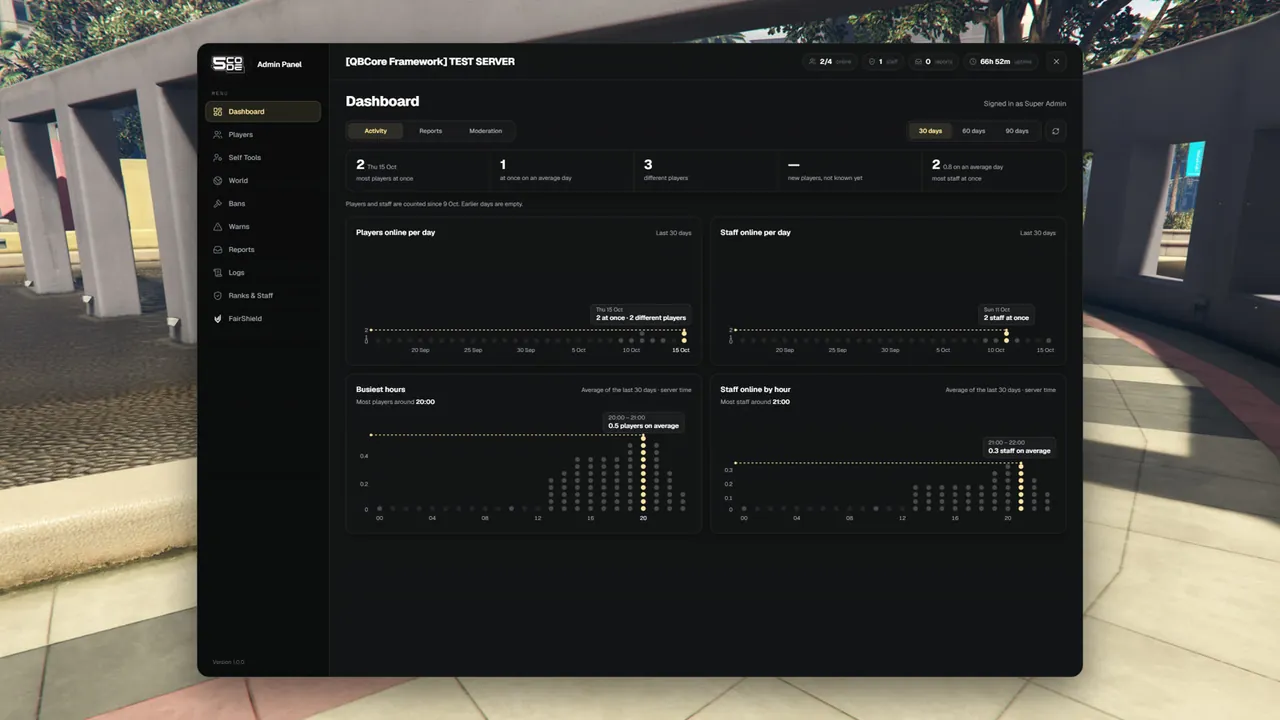
1. Open the panel
Type /admin in the chat.
You should see:
- The panel opens over the game. On the left is the menu: Dashboard, Players, Self Tools, World, Bans, Warns, Reports, Logs, Ranks & Staff, FairShield.
- The dashboard says Signed in as Super Admin.
- At the bottom of the menu: Version 1.0.0.
Close it with the X in the top right corner or with ESC.
2. Open the quick menu
Type /adminmenu.
You should see a small window on the right side of the screen with the title Quick Menu. It has three tabs: Me, Players and Tools. Above them is the line No tickets waiting.
3. Use a self tool
- In the quick menu, stay on the tab Me.
- Click God mode.
- The button turns gold and shows ON. A message says God mode is on.
- Click it again. The message says God mode is off.
One more: click To waypoint without a waypoint on your map. The answer is "Set a waypoint on the map first." Set a waypoint and click again: you stand there.
Part 2: with a second player
4. Go to and bring
- Type
/adminand open Players. - Click the second player in the list. Their profile opens on the right.
- Under Quick actions click Go to. You stand next to them. Message: You went to (name).
- Ask them to walk away, then click Bring to me. They stand next to you again. Message: (name) was brought to you.
5. Warn
- On the same profile, under Moderation, click Warn.
- Write a reason and click Warn.
| Who | Sees |
|---|---|
| You | (name) was warned |
| The player | "You have been warned: (your reason)" |
Open Warns in the menu. The warning is in the list, marked Active, with your name under Warned by.
6. A ticket
/report is the default name. If you changed Config.ReportCommand, type your own command.
- The second player types
/report I need help.- The player reads "Your ticket was sent to staff." A small tab My Ticket [F10] appears on the right edge of their screen.
- You read "New ticket #1 from (name)".
#1is the number of your first ticket.
- You open Reports in the panel. The ticket is in the column Open. Click Claim. Message: Ticket #1 claimed. The ticket page opens.
- The player presses F10 (or types
/ticket). The chat Support ticket #1 opens. It says that you are helping, with the line "(your name) is helping you now". - You write a message and click Send. The player reads it in the chat and answers. You get "New message in ticket #1".
- You click Resolve and confirm. Message: Ticket resolved. The player reads "Your ticket was closed" in the chat. If the chat was minimized, they get "Your ticket #1 was closed." instead.
7. A short admin jail
- Open the player's profile again (Players).
- Under Moderation click Jail.
- Which jail: Admin jail. Minutes:
1. Write a reason. Click Jail.- You read (name) was sent to jail. The profile shows Admin jail · 1m left.
- The player stands at the jail spot (by default the Bolingbroke prison yard) and reads "You were sent to admin jail for 1 minute(s). Reason: (your reason)".
- At the top of their screen: "Admin jail: 1 min left".
- After about one minute the player reads "You were released from jail." and stands where they stood before the jail.
A player who leaves the jail area (40 metres around the spot by default) is put back and reads "You are in admin jail. Stay here until your time is up."
You do not want to wait? Click Release from jail on the profile and confirm.
If something did not work
| What you see | Cause | Fix |
|---|---|---|
/admin answers "You do not have permission to do that." | You are not a super-admin and you have no rank. | Check the two lines of Installation step 5 and your license. Restart the whole server. |
/admin does nothing, or another menu opens | The panel did not start, or another admin menu uses the command. | Look for [5code-adminpanel] database ready. in the console. Stop the other menu (Installation step 3). |
| The panel works, but no notice appears on the screen | Config.NotifySystem does not match your server. | Set it in config.lua (General settings). |
| "That player has the same or a higher rank than you." | You are not super-admin, and the other player has your rank or a higher one. | Test with a player without a rank. |
/report answers Usage: /report <message> | The text after the command is missing. | Type /report and a text. |
/report answers "Wait a moment before you send another message." | Two reports right after each other. | Wait a few seconds. |
/ticket answers You have no open ticket. Use /report <message> to ask staff for help. | The player has no ticket, or it is resolved. | Write a new one with /report. |
| F10 does nothing for the player | The key is used by something else, or the player changed it. | /ticket always works. The key is under FiveM Settings > Key Bindings. |
| There is no Jail button | The admin jail is switched off and no prison script was found. | Jail settings |
| "That player is still loading in. Try again in a moment." | The player has no character in the world yet. | Wait until they have spawned. |
Full list: Troubleshooting.