Ranks & Staff
On this page9
On this page you create the ranks of your team, tick what each rank may do, and give a rank to a player. Everything is done in the panel. No file editing, no restart.
How ranks work
- A rank has a name, a power number and a list of permissions.
- A staff member can do what their rank's permissions allow.
- Power puts the ranks in order. A higher number is a stronger rank.
- Staff can only act on players with less power than their own. A player without a rank has power 0.
- A super-admin stands above every rank. See below.
The script starts with four ranks:
| Rank | Power | In short |
|---|---|---|
| God | 100 | Every permission |
| Admin | 80 | Everything except managing ranks and assigning staff |
| Moderator | 50 | Daily moderation: tickets, sits, warn, kick, jail |
| Helper | 20 | Read tickets, go to players, spectate, private message |
They come from Config.DefaultRanks. The script writes them once, at the very first start, when the
database has no ranks yet. After that you change them here: what you change or delete in the panel
stays. See Super-Admin & Ranks.
Create or edit a rank
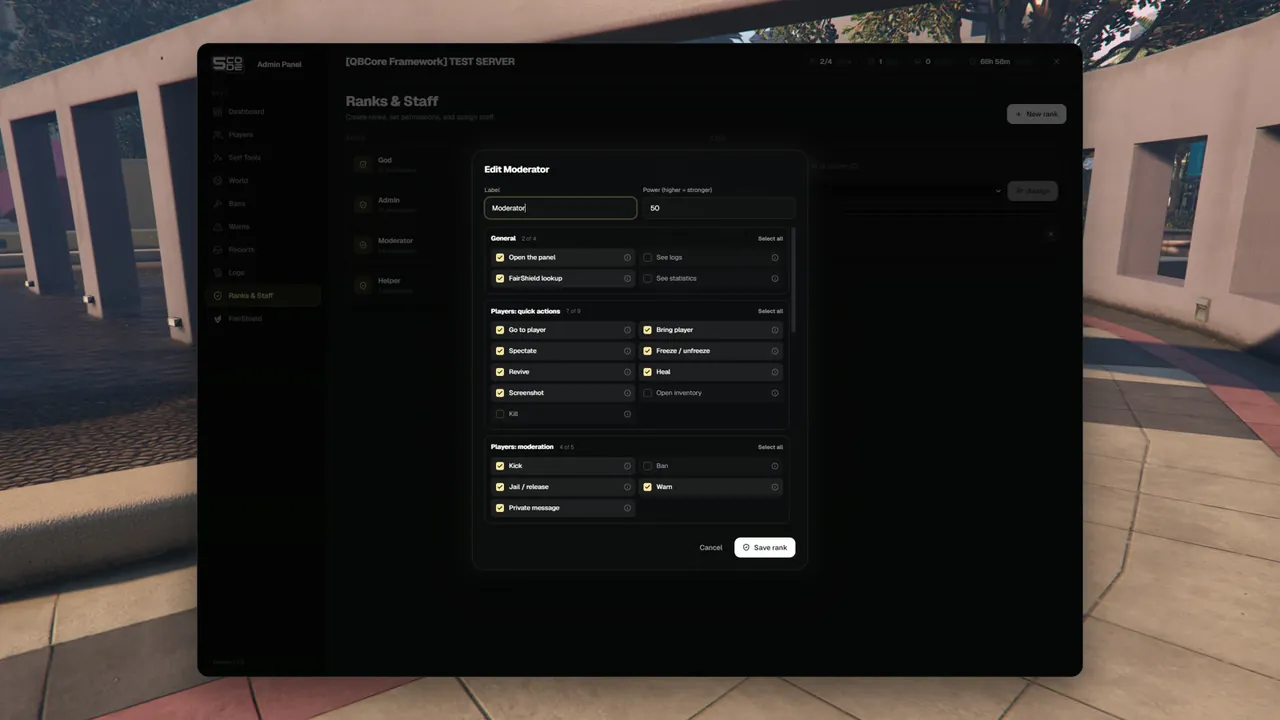
- Open Ranks & Staff in the menu.
- Press New rank, or the pencil on a rank.
- Type the Label, for example "Senior Mod".
- Type the Power (higher = stronger). It can be from 0 to 1000.
- Tick the permissions. Each one has a plain name and an (i) that explains it. Select all and Clear all work per group.
- Press Save rank. The panel says "Rank saved".
The bin on a rank deletes it. The panel asks first: "Staff assigned to it are unassigned and lose their access."
The left side of the page lists the ranks, the strongest first, with "All permissions" or the number of permissions.
The permissions in the editor
The editor sorts the permissions into groups. These are the names staff see:
| Group | Permissions |
|---|---|
| General | Open the panel · See logs · FairShield lookup · See statistics |
| Players: quick actions | Go to player · Bring player · Spectate · Freeze / unfreeze · Revive · Heal · Screenshot · Open inventory · Kill |
| Players: moderation | Kick · Ban · Jail / release · Warn · Private message |
| Players: give / set | Give / take money · Give items · Set job · Set model · Set bucket |
| Players: records | Read notes & alerts · Write notes & alerts · Offline players |
| Self tools | Noclip & super jump · God mode · Invisible · Teleport · Vehicles · See names, IDs and blips |
| World | Weather · Time · Blackout · PvP · Announcements · Clear vehicles / area · Mass actions |
| Bans & warnings | See bans · Revoke bans · See warnings · Revoke warnings |
| Reports | See tickets · Handle tickets · Run sits |
| Ranks & staff | Manage ranks · Assign staff |
- Every staff rank needs Open the panel (
panel.open). Without it the Players page stays closed. - Set model covers two buttons: Set Model and Reset look.
- Mass actions covers Freeze all, Unfreeze all, Bring all and Kick all. Give it only to ranks you trust to empty the server.
- See bans and See warnings also decide what a rank sees in the History of a player's profile.
- The key of each permission, what it allows and which default rank has it: Super-Admin & Ranks.
- A permission key you add yourself to
Config.Permissionsshows up in a group named Custom. - A rank with All permissions also gets the permissions that later versions add. It keeps that as long as every box stays ticked.
Give a rank to a player
- In the Staff box, type into the search: a name, a server ID or a citizen ID.
- The matches appear under it. Online players show
Online · ID 12, offline playersOffline · last seen 2d ago. A rank they already have is shown too. - Press Choose on the right player.
- Pick the rank under Select rank…. Only ranks below your own are offered.
- Press Assign. The panel says "Staff assigned".
Nobody has to type a license. The rank is active at once. A panel that is already open shows the new buttons after it is closed and opened again.
| Fact | Detail |
|---|---|
| Offline players | They appear in the search only when your rank has Offline players (player.offline). Type at least 2 characters |
| One rank per player | Assigning a new rank replaces the old one |
| The rank belongs to the account | It follows the player's game license, so it counts on all of their characters |
Remove a staff member
The Staff list shows every player with a rank: the name, the rank and who added them. Press the X ("Remove from staff") on a row. The panel says "Staff removed".
Super-admins are not in this list. When nobody has a rank yet the list says: "No staff assigned in-panel. Super-admins come from the ACE grant."
Rules
Nobody can lift themselves or a friend above their own rank.
| Rule | What staff read |
|---|---|
| You create and change only ranks with less power than your own | "You can only create or change ranks below your own." |
| You cannot edit or delete a rank at or above your own. That includes the rank you hold | "That rank is not below yours." |
| You tick only permissions you hold yourself. A permission the rank already had may stay | "You can only give permissions you have yourself." |
| A rank needs a name | "Rank needs a label" |
| You give only a rank below your own | "That rank is not below yours." |
| You cannot change or remove the rank of somebody with the same or a higher rank | "That player has the same or a higher rank than you." |
| You cannot change your own rank | "You cannot change your own rank." |
| The rank was deleted in the meantime | "That rank no longer exists." |
Super-admin
A super-admin is not a rank in the panel. It comes from your server files:
- the ACE named in
Config.SuperAdminAce(default5code-adminpanel.admin), or - a license listed in
Config.Bootstrap.
| What a super-admin has | Detail |
|---|---|
| Every permission | Shown as Super Admin |
| A place above every rank | No rank can act on a super-admin, whatever its power |
| No limits on this page | A super-admin can create, edit and give any rank, also the top one |
How to make yourself super-admin is on Super-Admin & Ranks.
Permissions for this page
| Name in the rank editor | Key | Needed for |
|---|---|---|
| Manage ranks | ranks.manage | New rank, the pencil and the bin |
| Assign staff | staff.assign | The search, Assign and the X on a staff member |
| Offline players | player.offline | Finding offline players in the search |
The page is in the menu for staff who have at least one of the first two.
Settings
| Key | What it changes |
|---|---|
Config.DefaultRanks | The ranks the script creates by itself |
Config.Permissions | The permission keys a rank can hold |
Config.SuperAdminAce, Config.Bootstrap | Who is super-admin |
All of them are explained on Super-Admin & Ranks.
Limits
- One rank per player.
- Super-admins cannot be made or removed in the panel. They come from the ACE or from
Config.Bootstrap. - Changing
Config.DefaultRankslater does not change ranks that already exist. Edit them in the panel. - The ranks from
Config.DefaultRanksare only created at the first start, when there are no ranks yet. A rank you delete in the panel stays deleted. - Rank changes are in the Logs as
/rank,/delrank,/setstaffand/removestaff.