Player Guide
On this page7
For every player: how to ask staff for help, how the ticket window works, and what the notices from staff mean. Nothing here is technical.
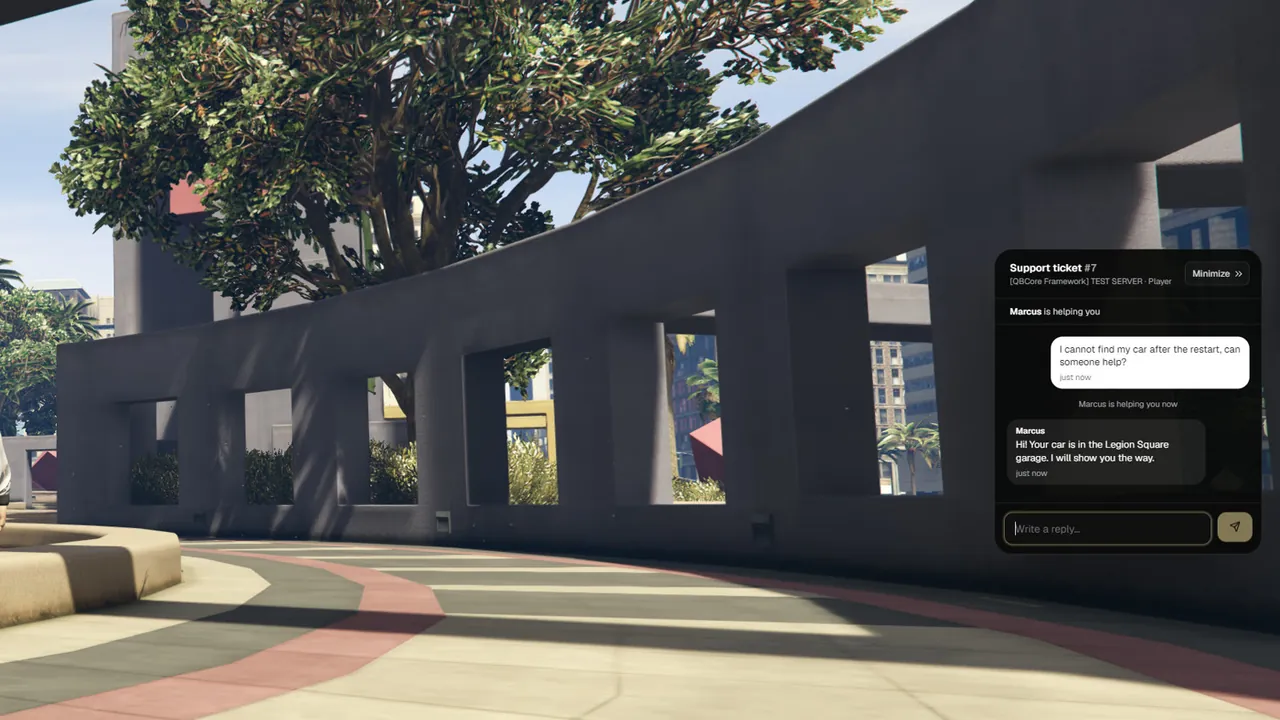
Ask staff for help
- Open the chat and type
/reportand your message. Example:/report A car is stuck in the door of the bank - You read: "Your ticket was sent to staff."
- A small tab appears on the right edge of your screen: My Ticket [F10].
- Press F10 to open your ticket and talk to staff.
| You read | What it means |
|---|---|
| "Your ticket was sent to staff." | Staff can see your ticket now. |
| "Your message was added to your open ticket." | You already had a ticket. Your new text was added to it. You have one ticket at a time. |
Usage: /report <message> | You typed /report without a message. |
| "Wait a moment before you send another message." | You sent two reports very quickly. Wait a few seconds. |
Your server may have given /report another name. Then you type that name, and the texts on this
page show it in place of /report.
The ticket window
The window is a small chat between you and the staff member who helps you.
| On screen | What it means |
|---|---|
| Support ticket #12 | The number of your ticket. |
| "Waiting for a staff member…" | Nobody has taken your ticket yet. |
| "… is helping you" (with a name) | A staff member took your ticket. Write to them here. |
| "Your ticket is waiting for a staff member again" | The staff member gave your ticket back, or left the server. Another one will take it. |
| "Your ticket was closed" / "This ticket is closed." | Staff closed your ticket. |
| "Need more help? Type /report and your message in the chat." | The ticket is closed. Use /report again for a new one. |
- Write in the box at the bottom and press Enter.
- Minimize or Escape puts the chat away. The tab stays on the edge of the screen, so you can keep playing.
- A number on the tab means staff wrote something new.
- If staff close your ticket while the chat is put away, you read "Your ticket #12 was closed." (with your ticket number) and the tab is gone.
- Your ticket is still there after you leave and join again.
The ticket key and /ticket
| How | What it does |
|---|---|
| F10 | Brings your ticket chat back. |
/ticket | The same, typed in the chat. |
- The tab shows the key that works for you: My Ticket [F10].
- You can choose another key in the game's Settings > Key Bindings > FiveM: look for "Open my support ticket".
- Without a ticket,
/ticketanswers:You have no open ticket. Use /report <message> to ask staff for help.
Your server may use another key or another command name. The tab always shows the right one.
Notices from staff
| You read | What happened |
|---|---|
| A staff name and a message | A private message from staff. It is also in your chat. |
| "ANNOUNCEMENT" and a message, in the chat | A message from staff to everybody on the server. You also get it as a notice. |
| "You have been warned: …" | Staff gave you a warning, with the reason. It stays on your record. |
| "You were frozen by staff." | You cannot move until staff let you go. If you were in a vehicle, you are taken out of it. |
| "You can move again." | Staff ended the freeze. |
| "You were revived by staff." | Staff brought your character back up. |
| "You have been kicked: …" | Staff removed you from the server, with the reason. You can join again. |
| "Server maintenance", or a reason staff typed, when you lose the connection | Staff removed all players at once, for example before maintenance. You can join again. |
| "No clothing script was found to load your character." | Staff tried to give you your own look back, but the server has no clothing script for it. Tell staff. |
Banned. You are removed from the server. When you try to join, you read the ban message of the server with the reason. By default:
You are banned from this server.
Reason: <the reason>
A ban with an end date also shows: "Banned until: …" with the date and time.
In a sit
A sit is a talk with staff in a private room. Staff use it to sort out a report. You can be brought to a sit for your own ticket, or because somebody else's ticket is about you.
| Step | What you see |
|---|---|
| Before | Often a message from "Staff (ticket #12)" that asks you to stop somewhere safe. |
| Start | You are moved to the sit room. You read: "Staff brought you to a sit to talk to you." |
| During | Only the people of that ticket are in the room. Nobody else can walk in. |
| End | Staff decide: you are sent back to where you stood before, you are left at the sit room, or you are sent to jail. |
- If you leave the server during a sit, you are put back into the sit when you join again. If the sit is over by then, you get what staff decided for you.
- If the staff member leaves the server, the sit ends and everybody is sent back.
In the admin jail
The admin jail is a punishment from staff. You read: "You were sent to admin jail for 10 minute(s). Reason: …" with your own time and reason.
| What | How it works |
|---|---|
| Where | You are moved to the jail area. You can walk around inside it. |
| Time | A line at the top of the screen shows it: "Admin jail: 10 min left". |
| Leaving the area | You are put back and read: "You are in admin jail. Stay here until your time is up." |
| Weapons and vehicles | You cannot use weapons, fight or get into a vehicle. |
| Leaving the server | Does not end it. The time only counts while you are in the game. |
| End | You read "You were released from jail." and you are put back where you stood before. |
Staff can also let you out early. You read the same line: "You were released from jail."
Every command
See Commands.