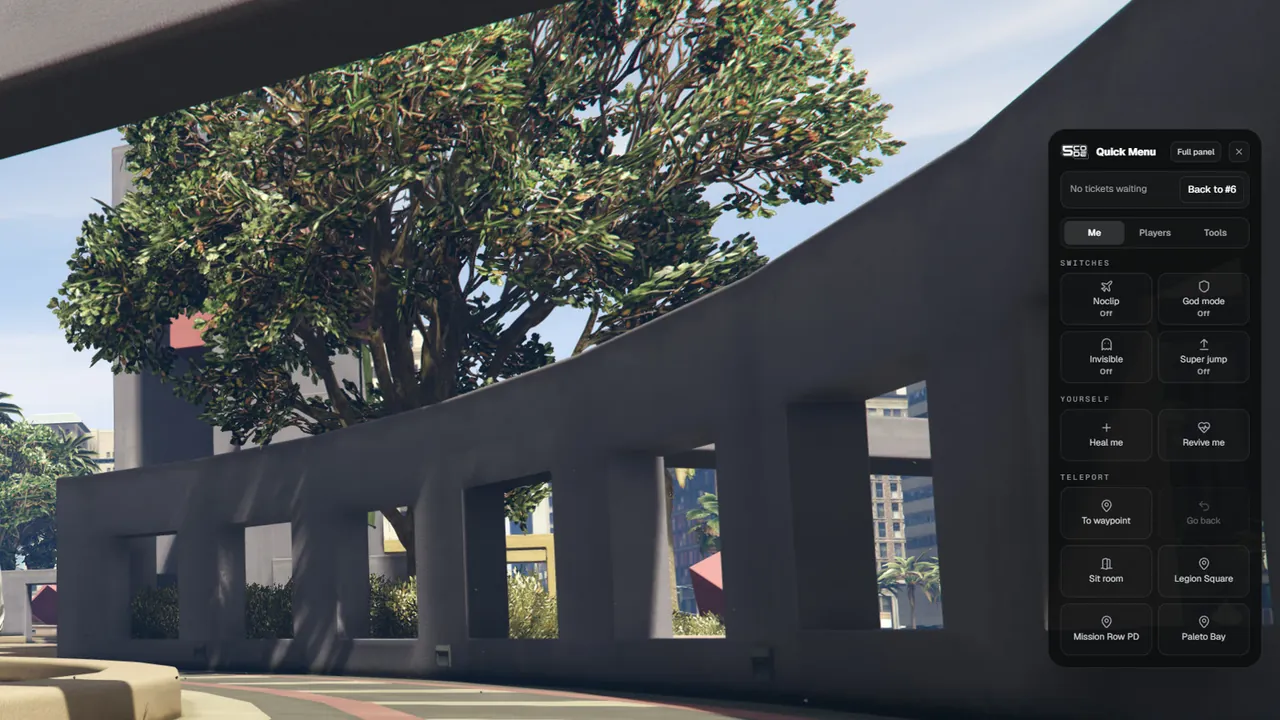
A small menu on the right side of the screen, for the things staff use every minute: their own
switches, the players standing near them, and the next ticket.
# Using it
Type /adminmenu. The menu titled "Quick Menu" opens on the right.
Pick a tab: Me , Players or Tools .
Press a button. A short message says what happened.
Close it with the X or with Escape . Full panel opens the big panel instead.
The menu opens for everybody with a staff rank or super-admin. A tab is only shown when the rank has something on it.
The menu opens again on the tab you used last.
A key can be set with Config.MiniMenuKey. It is empty by default.
# The ticket lineThe line on top of the menu shows the tickets nobody has claimed yet. It needs See tickets (reports.view).
The line shows Meaning
"No tickets waiting" Every ticket is claimed or resolved "[number] tickets waiting" That many tickets wait for a staff member Take next Gives you the oldest waiting ticket: "Ticket #[number] is yours". The full panel opens on it. Needs Handle tickets (reports.manage) Back to #[number] You already handle a ticket. The button opens it in the full panel
The number is checked every 20 seconds, and at once when a ticket changes.
If a colleague was faster, you read: "No ticket is waiting."
Everything else about tickets is on Tickets .
# The Me tabThe quick menu sits at the side of the screen. The game stays playable. Group Buttons Permission
Switches Noclip, God mode, Invisible, Super jump. A switch that is on is gold and says ON Noclip & super jump (self.noclip), God mode (self.god), Invisible (self.invisible) Yourself Heal me, Revive me Heal (player.heal), Revive (player.revive) Teleport To waypoint, Go back, and one button per saved place Teleport (self.teleport) Teleport Sit room Run sits (reports.sit)
What each tool does: Self Tools .
# The Players tabWith an empty search box the tab shows who stands near you.
Nearby list Detail
Heading "Nearby · within 30 metres". The distance is Config.Quick.NearbyRadius Who is listed The 8 nearest players in your dimension, nearest first Each row Server ID, name, "[number] m away", and "frozen" or "spectating" when that is so Refresh Every 2 seconds Nobody near "Nobody within 30 metres. Type a name or a server ID to find someone."
Type in the box to find anybody on the server.
Search Detail
Finds A part of the name, the server ID, the citizen ID or the job Shows The 6 best hits, with "6 of [number] · keep typing" when there are more One hit, or the exact server ID Its buttons open by themselves
Click a row to get its buttons.
Button In the Nearby list In the search Permission
Spectate / Stop spectating Yes Yes Spectate (player.spectate) Freeze / Unfreeze Yes Unfreeze only, on a frozen player Freeze / unfreeze (player.freeze) Go to No Yes Go to player (player.goto) Bring to me Yes Yes Bring player (player.bring) Profile Yes Yes Open the panel (panel.open)
Profile opens the full panel on that player. Kick, ban, warn, jail and the rest are there. See Player Actions .The rank rule holds here too: "That player has the same or a higher rank than you."
A staff member who is invisible, in noclip or spectating is not in the Nearby list of staff with a lower or the same rank. See Self Tools .
Group Buttons Permission
My vehicle A field for the model name with Spawn , then Fix vehicle, Flip vehicle, Delete vehicle Vehicles (self.vehicle) Show players Names and IDs, Players on the map See names, IDs and blips (self.names) Around you Clear area Clear vehicles / area (world.clear) Around you Copy my position None
Clear area asks first, and removes the empty vehicles and street NPCs around you. See World .Copy my position copies a line like vector4(195.17, -933.77, 29.70, 144.50). Paste it into
config.lua for the sit room, the admin jail or a saved place.
# While you spectateA bar at the bottom of the menu shows "Spectating [name]" with a Stop button. It stays there on
every tab. This is the place to stop spectating.
Quick menu Full panel
Command /adminmenu/adminSize A small window on the right A large window in the middle Players Near you, or found by search. Four buttons The whole list, the profile, every action, offline players Self tools All of them, with ON / Off The four switches, the waypoint and the vehicle card Tickets The waiting count and Take next The board, the chat, the sits World Clear area Weather, time, blackout, PvP, announce, mass actions Only here Nearby, Go back, saved places, Heal me, Revive me, Flip vehicle, Names and IDs, Players on the map, Copy my position, Stop spectating Bans, warns, logs, ranks, statistics, FairShield
# SettingsKey Default What it changes Page
Config.MiniMenuCommand'adminmenu'The command that opens the menu General Config.MiniMenuKey''An optional key. Empty = no key General Config.Quick.NearbyRadius30.0How far Nearby looks, in metres Quick Menu & Places Config.Quick.ClearRadius50.0How far Clear area reaches, in metres Quick Menu & Places Config.Places3 places The saved places on the Me tab Quick Menu & Places Config.SitRoomSet Where Sit room leads. false removes the button Tickets & Sits
# Limits
While the menu is open, the mouse and the keyboard belong to the menu. Close it to move your character.
Nearby lists the 8 nearest players, and only players in your own dimension.The "frozen" mark only knows about freezes made through the panel.
With a rank that has nothing on it, the menu says: "Your rank has nothing in the quick menu. Open the full panel instead."