Players
On this page10
The Players page finds a player, online or offline, and shows everything staff need to know about them. The buttons that act on the player are on Player Actions.
Using it
- Open the panel with
/adminand click Players. - Type in the search box, or scroll the list.
- Click a player. The profile opens on the right.
- Read the profile, write a note, or press an action button.
The page needs the Open the panel permission (panel.open).
The online list
Each row shows the server ID, the name, the job and the ping. A red number on a row is the count of active alerts on that player.
| The search finds | Example |
|---|---|
| A part of the name | mik |
| The exact server ID | 12 |
| A part of the citizen ID | ABC12 |
| A part of the job name | police |
- The heading shows how many players are online.
- The list does not refresh by itself. Press the round arrow, or type in the search box.
The profile
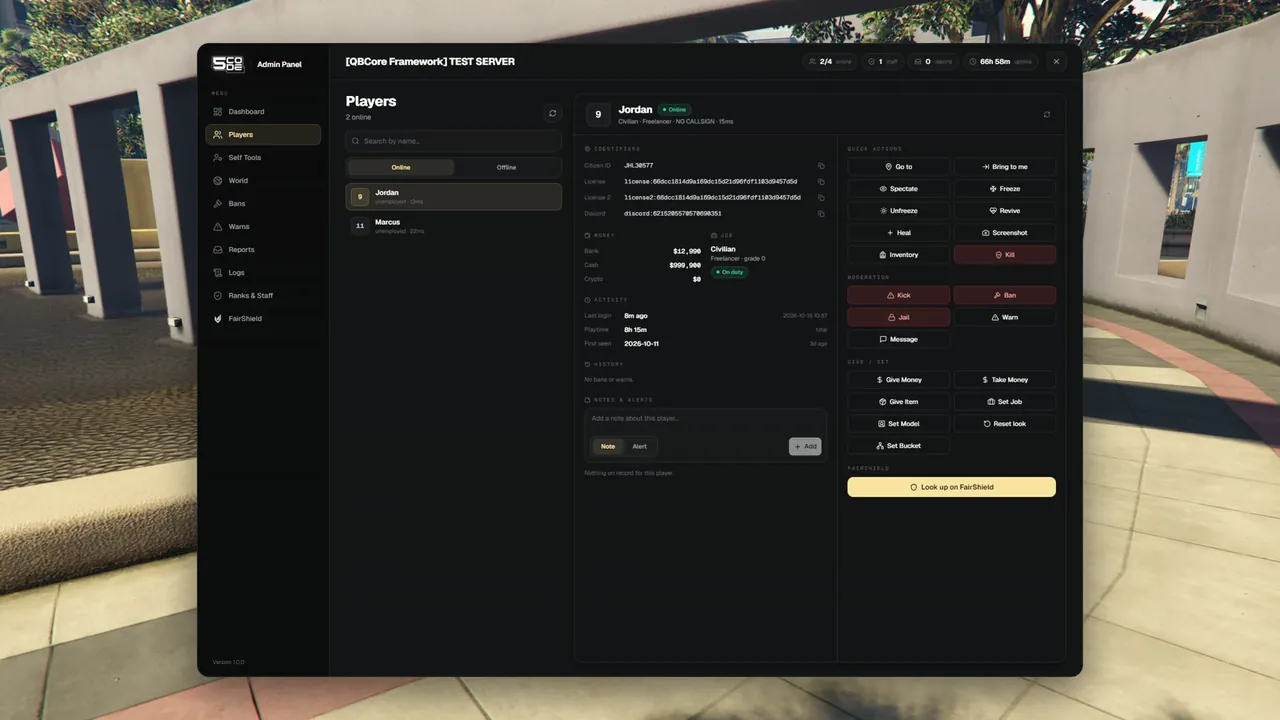
| Part | What it shows |
|---|---|
| Header | Server ID, name, Online or Offline, the number of active alerts, a jail badge with the minutes left, and one line with job, grade, callsign and ping |
| Alerts | Every active alert in a red band at the top, with who wrote it and when |
| Identifiers | Citizen ID, License, License 2, Discord, Steam, FiveM, Xbox, Live. Each has a copy button |
| Money | Every account the framework knows, for example cash and bank |
| Job | Job, grade, and On duty or Off duty |
| Activity | Last login, Playtime (total) and First seen |
| History | The player's bans and warns, newest first. See History |
| Notes & alerts | What staff wrote about this player |
| Actions | The buttons your rank may use. See Player Actions |
| FairShield | Look up on FairShield. See FairShield Lookup |
- The IP address of a player is never shown.
- Playtime and "First seen" are counted by the panel. They start on the day the panel was installed.
- For an offline player the header reads "last seen [time] ago" in place of the ping.
- The round arrow in the header loads the profile again.
History
The History part of the profile lists the bans and warns this player got, the newest first. The number next to the heading is how many entries are shown.
| On each entry | What it tells you |
|---|---|
| Ban or Warn | The kind of entry |
| The reason | What the staff member wrote |
| "by [name] ([rank])" | Who gave it, with the rank they had |
| The date and how long ago | When it was given |
| The state of a ban | "Active, permanent", "Active until [date and time]", "Expired" or "Revoked by [name]" |
| The state of a warn | "Revoked by [name]" when it was taken back. Nothing when it still stands |
| Rule | Detail |
|---|---|
| Who sees bans | Ranks with See bans (moderation.bans.view) |
| Who sees warns | Ranks with See warnings (moderation.warns.view) |
| A rank with neither | The profile has no History part |
| How many | The newest 20 bans and the newest 20 warns |
| Nothing on record | "No bans or warns." A rank that sees only one kind reads "No bans." or "No warns." |
| Offline players | The History is on the stored profile too |
The History is for reading. To lift a ban or a warn, use Revoke on the Bans or Warns page. See Bans & Warns.
Notes and alerts
Staff can write two kinds of text on a player.
| Kind | What it is for | Where staff see it |
|---|---|---|
| Note | Something to remember about the player | In Notes & alerts on the profile |
| Alert | Something every staff member must see | A red number on the player's row, a red band on top of the profile, and in Notes & alerts |
| What staff do | Result |
|---|---|
| Type the text, pick Note or Alert, press Add | The text is saved with the staff member's name and the time |
| Clear on an alert | The alert is no longer active. It stays in the list as a "cleared alert" |
| The bin on a note or alert | It is deleted for all staff |
- A text can be up to 1000 characters long.
- Notes belong to the player's account. They show on every character of that player.
- The profile shows the 100 newest notes and alerts.
- Notes can be written on an offline player too.
Offline players
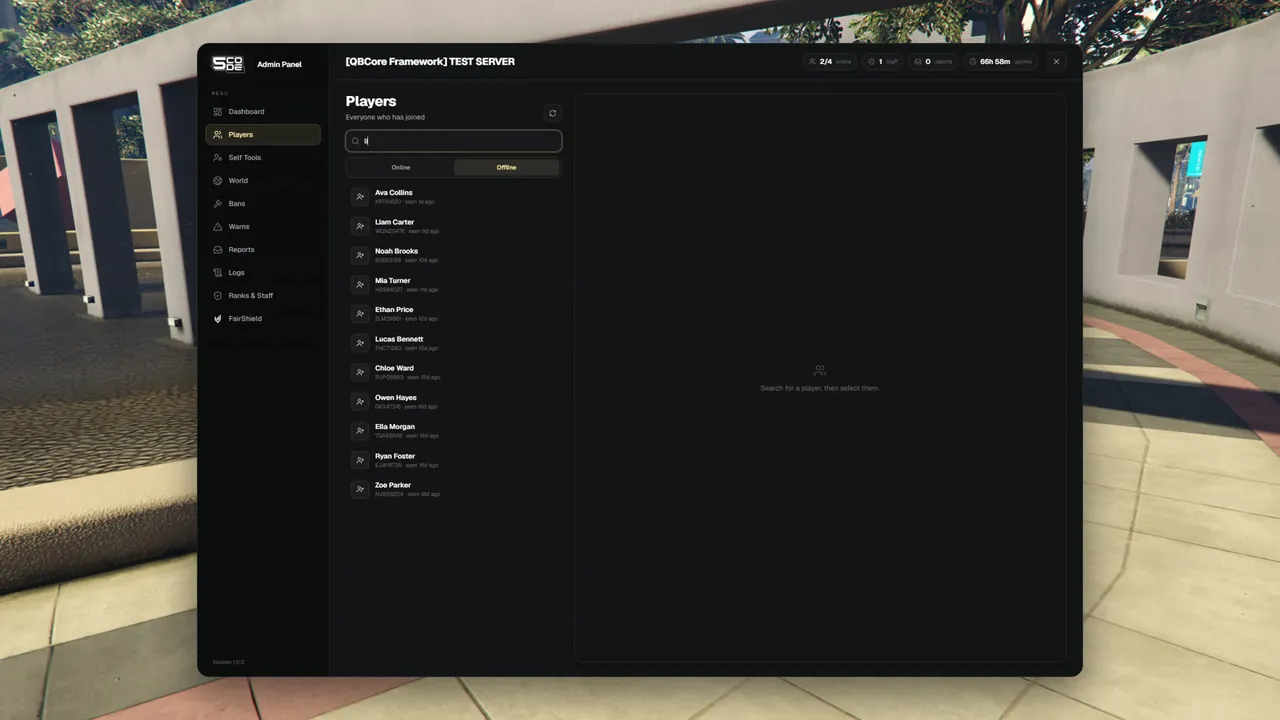
Staff with the Offline players permission get an Online / Offline switch above the list.
- Switch to Offline.
- Type at least 2 characters: a part of the name, the citizen ID or the license.
- Click a row. The stored profile opens.
Each row shows the name, the citizen ID and "seen [time] ago". The search shows up to 25 players. It looks in the characters your framework has stored, and in the panel's own record of everybody who has joined. A character that is being played right now is left out: find it in the online list.
| On an offline player | Works | Permission |
|---|---|---|
| Open the profile | Yes | Offline players (player.offline) |
| Ban | Yes | Ban (player.ban) and Offline players (player.offline) |
| Warn | Yes | Warn (player.warn) and Offline players (player.offline) |
| Release from the admin jail | Yes | Jail / release (player.jail) |
| Notes and alerts | Yes | Read / Write notes & alerts |
| FairShield lookup | Yes, when a Discord account is stored for the player | FairShield lookup (fairshield.lookup) |
| Everything else | No. The profile says: "This player is offline. Ban, warn, notes and lookup still work; live actions need them connected." |
What a player is doing
The panel knows what an online player is doing right now. Staff see it wherever they pick people for a ticket: on the people of a ticket, in the Add player list and before a Bring. See Tickets and Sits. On the Players page the profile shows the jail badge.
| The player | Text shown |
|---|---|
| Is in a sit | "In a sit (ticket #[number])" |
| Is in the admin jail | "In admin jail" |
| Is in the police prison | "In police prison" |
| Is dead or downed | "Dead or downed" |
| Is handcuffed | "Handcuffed" |
| Drives a vehicle | "Driving" |
| Sits in a vehicle as a passenger | "In a vehicle" |
| None of these | "Free" |
One text is shown at a time. The table is in the order the panel checks: a jailed player who is also dead shows as jailed.
Permissions
| Permission | Key | Allows |
|---|---|---|
| Open the panel | panel.open | The Players page, the online list and the profile |
| Read notes & alerts | player.notes.view | See notes, alerts and the red alert numbers |
| Write notes & alerts | player.notes.manage | Add notes and alerts, clear alerts, delete notes |
| Offline players | player.offline | The Offline switch, the offline search and the stored profile |
| See bans | moderation.bans.view | The bans in a profile's History |
| See warnings | moderation.warns.view | The warns in a profile's History |
Every action button has its own permission. See Player Actions.
Settings
| Key | What it changes here |
|---|---|
Config.Framework | Where the job, the money and the offline characters are read from. See General |
Job, money, "dead" and "handcuffed" are read through the open file bridge/framework_server.lua.
A server that stores characters in its own way changes them there. See
Bridge Files.
Limits
- On ESX the panel does not know whether a player is handcuffed, until your developer adds your
police script in
bridge/framework_server.lua. - Only ban, warn, release from the admin jail, notes and the FairShield lookup work on an offline player.
- A player the framework has no character for is still found, when the panel saw them join. The profile then has no job and no money.
- A player with no Discord linked cannot be checked on FairShield.
- More limits: Known Limitations.