World
On this page11
The World page changes things for everybody on the server: weather, time, blackout, PvP, an announcement, and actions on all players at once (freeze, bring, kick).
Using it
- Open the panel with
/adminand click World. The page is titled "World Controls". - Press a button. The change is made at once for every player. Four buttons ask first: see The panel asks first.
- A short message in the panel says what was done, for example "Time set".
A card is only shown when the rank has its permission.
What is on the page
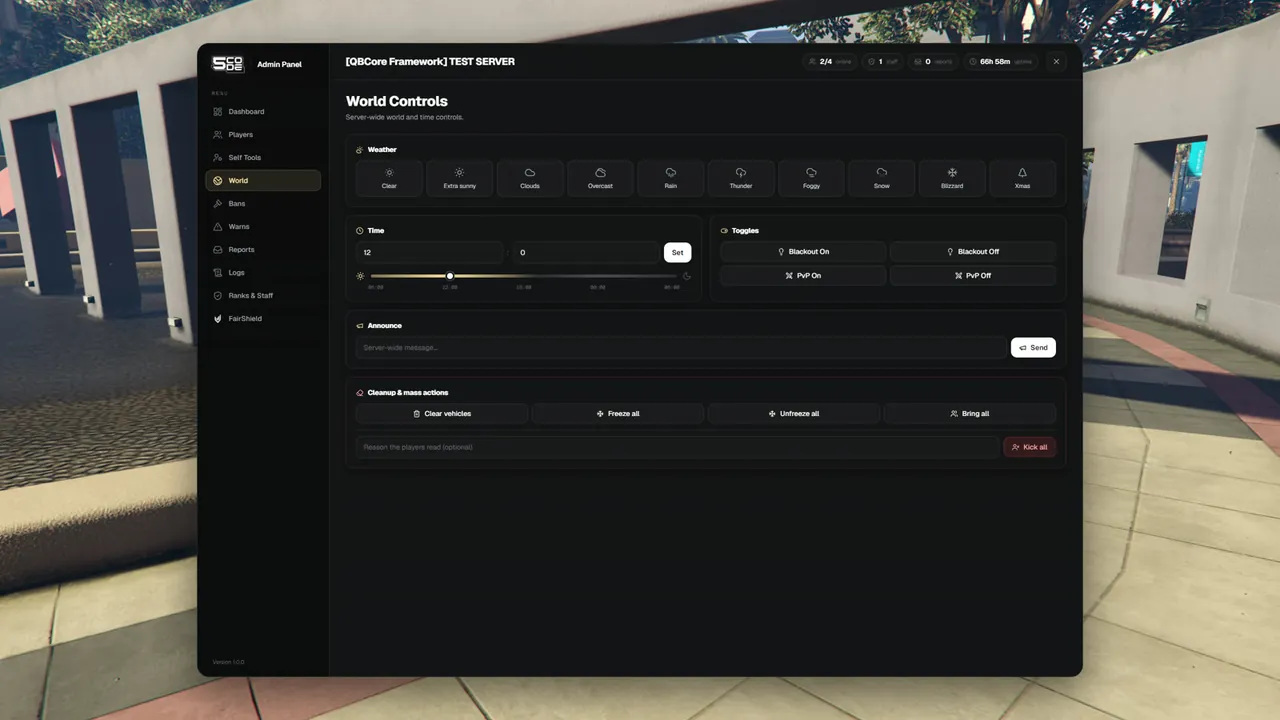
| Card | Buttons | What happens | Permission |
|---|---|---|---|
| Weather | Clear, Extra sunny, Clouds, Overcast, Rain, Thunder, Foggy, Snow, Blizzard, Xmas | The weather changes for everybody | Weather (world.weather) |
| Time | Hour, minute and Set. A slider from 06:00 to 06:00 fills in the two fields | The clock is set for everybody when you press Set | Time (world.time) |
| Toggles | Blackout On, Blackout Off | The city lights go off or on | Blackout (world.blackout) |
| Toggles | PvP On, PvP Off | Players can or cannot hurt each other | PvP (world.pvp) |
| Announce | A text field and Send | Every player gets the message | Announcements (world.announce) |
| Cleanup & mass actions | Clear vehicles | Every empty vehicle on the whole map is removed | Clear vehicles / area (world.clear) |
| Cleanup & mass actions | Freeze all, Unfreeze all, Bring all | Every player you may act on is frozen, unfrozen or moved to you | Mass actions (world.mass) |
| Cleanup & mass actions | A reason field and the red Kick all button | Every player you may act on is removed from the server | Mass actions (world.mass) |
What players see
| Action | The player sees |
|---|---|
| Announce | A chat line "ANNOUNCEMENT: [message]" and a notice with the message. The name of the staff member is not shown |
| Freeze all | "You were frozen by staff." |
| Unfreeze all | "You can move again." |
| Bring all | Nothing. They are moved |
| Kick all | The reason you typed. With no reason: "Server maintenance" |
| Weather, time, blackout, PvP | The change itself |
An announcement can be up to 300 characters long. A custom chat script may draw the chat line in its own way.
The panel asks first
Four buttons hit the whole server at once. Each one opens a box you have to confirm.
| Button | Question | Text under it |
|---|---|---|
| Clear vehicles | "Remove every empty vehicle on the map?" | "Parked player cars too." |
| Freeze all | "Freeze all players?" | "Every player below your rank is frozen where they stand, until you press "Unfreeze all"." |
| Bring all | "Bring all players to you?" | "Every player below your rank is teleported to where you stand." |
| Kick all | "Kick every player below your rank?" | "They are removed from the server at once. You and staff of your rank or higher stay." |
Unfreeze all does not ask. It only gives back.
The rules
| Rule | Detail |
|---|---|
| Who "all" is | Every player without a rank, and staff of a lower rank than yours. Never yourself, never staff of the same or a higher rank |
| Clear vehicles | Vehicles with somebody inside are kept. So are vehicles attached to another one, for example on a tow truck. The panel then says how many it removed, for example "Cleared 12 vehicles" |
| PvP | The panel leaves PvP alone until somebody presses a PvP button. After that, players who join later get the same setting |
Kick all
Kick all removes every player below your rank from the server, for example before maintenance.
It needs Mass actions (world.mass).
- Type a reason in the field "Reason the players read (optional)". It can be up to 300 characters long.
- Press the red Kick all button.
- Confirm the box. The panel says "Kicked all players".
| What | Detail |
|---|---|
| Who is kicked | Every player below your rank. You stay, and so do staff of your rank or higher |
| What they read | Your reason. With an empty field: "Server maintenance" |
| Can they come back | Yes. It is a kick, not a ban |
| In the log | One line with the tag /kickall and the reason, in the category Actions |
The default reason is in the locale file. See Localization.
Clear area (quick menu)
Clear area is in the quick menu (/adminmenu), on the Tools tab. It needs the same
permission as Clear vehicles (world.clear).
| What | Detail |
|---|---|
| Reach | Config.Quick.ClearRadius metres around you (default 50), in your own dimension |
| Removes | Empty vehicles and street NPCs |
| Keeps | Players, vehicles with somebody inside, and NPCs that another script created |
| Question first | Yes: "Remove the empty vehicles and NPCs within 50 metres of you? Parked cars count as empty. Players, and vehicles with someone inside, are not touched." |
| Result | For example "Removed 4 vehicles and 2 NPCs", or "Nothing to clear nearby" |
| Pressed twice quickly | "Wait a few seconds before you clear the area again." |
Servers with a weather sync script
Most servers run a script that keeps weather and time the same for everybody. The panel has to tell that script, or the script would undo the change a few seconds later.
| Your server runs | What the panel does |
|---|---|
qb-weathersync or Renewed-Weathersync | Hands weather, time and blackout to it. Nothing to set up |
| Another weather or time sync script | It must be added to the open file bridge/world.lua, at the marked places. Until then that script overrules the panel, sooner or later. esx_weather (ESX 1.16 and newer) does so at its next weather change, every 30 minutes by default |
| No sync script | The panel sets weather, time and blackout on every player by itself |
With no sync script:
- Players who join later get the weather and the blackout the panel set. They do not get the time.
- Vehicle lights stay on during a blackout.
PvP is always set by the panel itself, with or without a sync script.
See Notifications, Chat & Weather and Bridge Files.
Permissions
| Permission | Key | Allows |
|---|---|---|
| Weather | world.weather | The Weather card |
| Time | world.time | The Time card |
| Blackout | world.blackout | Blackout On and Off |
| PvP | world.pvp | PvP On and Off |
| Announcements | world.announce | The Announce card |
| Clear vehicles / area | world.clear | Clear vehicles on this page, Clear area in the quick menu |
| Mass actions | world.mass | Freeze all, Unfreeze all, Bring all, Kick all |
The World page is in the menu when the rank has at least one of them.
Settings
| Key | What it changes here | Page |
|---|---|---|
Config.Quick.ClearRadius | How far Clear area reaches | Quick Menu & Places |
Config.NotifySystem | How the announcement notice is drawn | General |
Limits
- The page has buttons only. It does not show the weather, the time, or whether blackout and PvP are on right now.
- The panel does not remember weather, blackout or PvP over a restart of the resource.
- There is no button to send everybody back after Bring all.
- Kick all is one log line under Actions. It is not in the Kick filter of the Logs page and not in the kick numbers of the Dashboard.
- If a sync script refuses a change, the panel says: "That did not work. Try again."
- Every action on this page is written to the Logs.