Jail
On this page8
Staff can lock a player up for a number of minutes. There are two jails: the admin jail that is built into the panel, and the police prison of your server's own prison script.
The two jails
| Admin jail | Police prison | |
|---|---|---|
| What it is | Part of the panel. Works on every framework | The prison script your police job uses |
| Where the player goes | The spot in Config.AdminJail (the Bolingbroke prison yard by default) | Where your prison script puts prisoners |
| Who runs the time | The panel | Your prison script |
| Release of an offline player | Yes | No |
| Works when | Config.AdminJail is set (it is by default) | A prison script is connected |
Send a player to jail
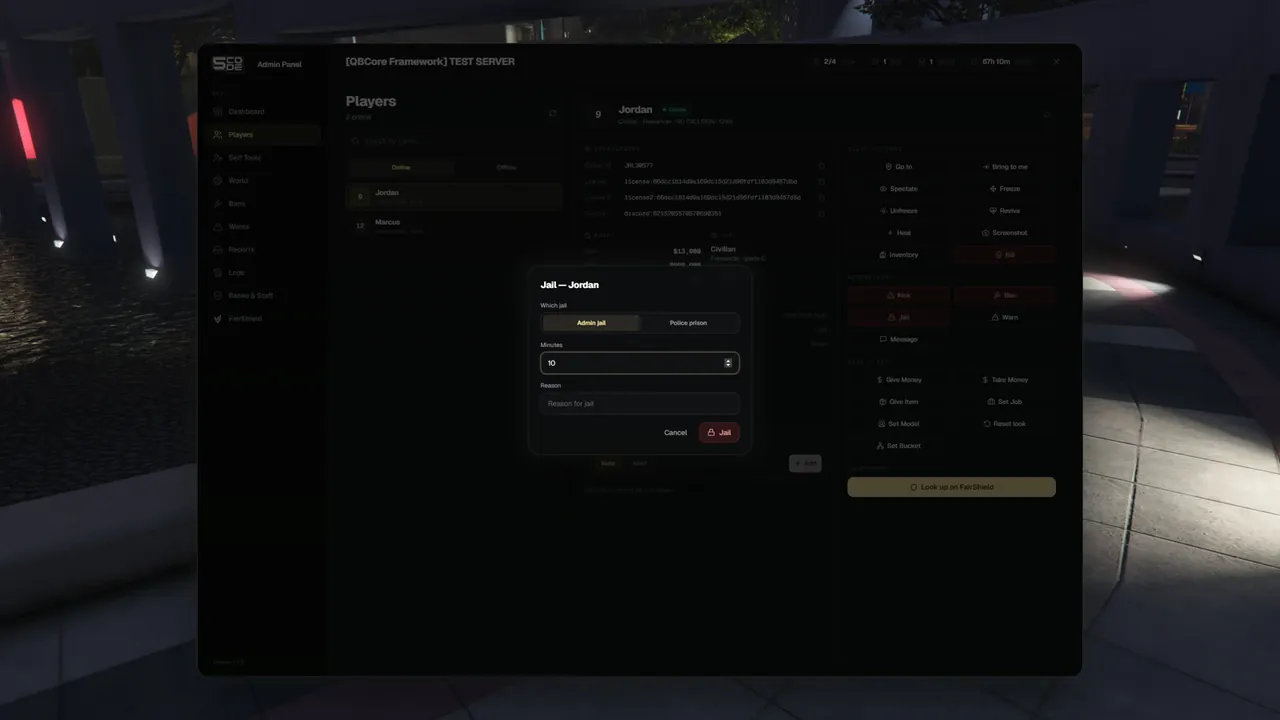
- On Players, pick the player. They must be online.
- Under Moderation, press Jail.
- Choose Admin jail or Police prison under Which jail.
- Type the Minutes (starts at
10) and the Reason. - Press Jail. The panel says
<name> was sent to jail.
The same button is on the ticket page. A player who is in a sit room is jailed when you end the sit. See Sits.
| Field | Rule |
|---|---|
| Minutes | From 1 minute to 10080 minutes (one week). A higher number is cut to one week |
| Reason | Left empty, it is saved as "No reason given" |
Admin jail
What the player sees
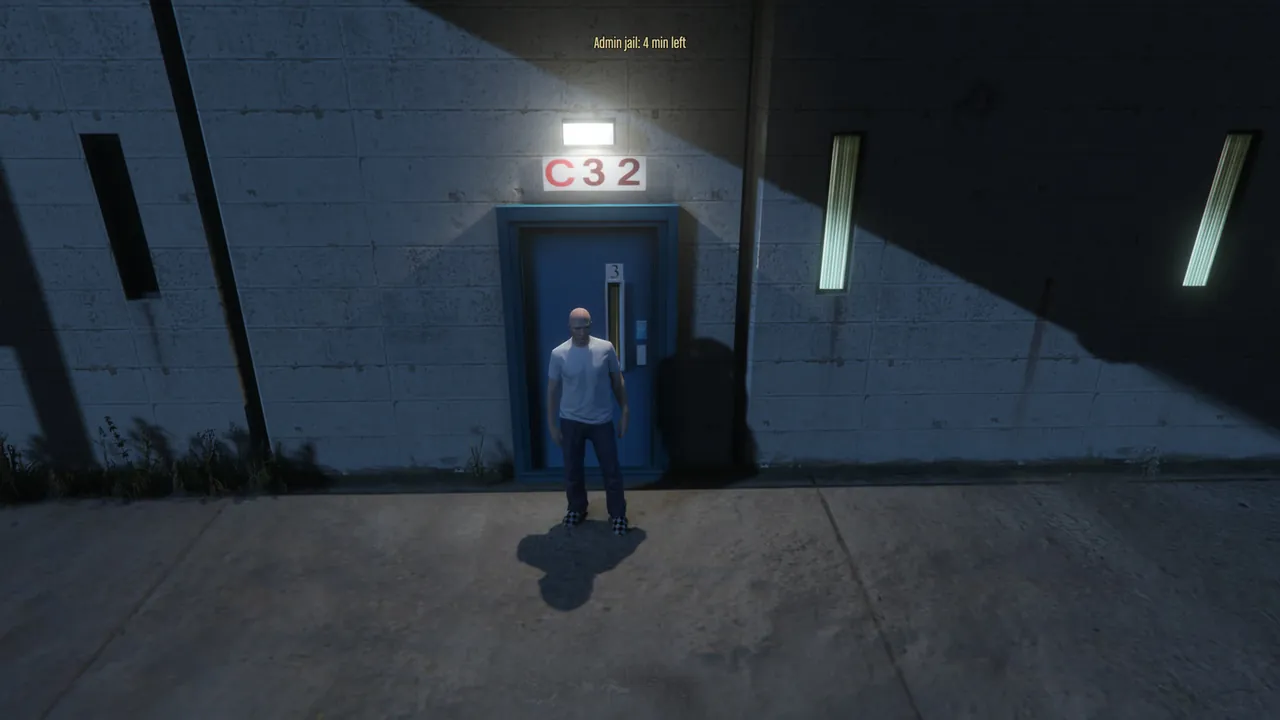
| Moment | Text |
|---|---|
| Sent to jail | The notice You were sent to admin jail for 10 minute(s). Reason: <reason> |
| The whole time | Admin jail: 8 min left at the top of the screen |
| They leave the yard | The notice "You are in admin jail. Stay here until your time is up." |
| The time is up, or staff release them | The notice "You were released from jail." |
What the player cannot do
- Shoot, aim, punch or pick a weapon.
- Get into a vehicle. A player who sits in one is taken out and put on the jail spot.
- Leave the yard. Whoever gets further from the spot than the
radiusis put back on it.
Nothing is taken away. Items, money and the job stay as they are.
Time, leaving and coming back
| Situation | Result |
|---|---|
| The player is online with their character in the world | The time runs |
| The player leaves the server | The time stops. Leaving does not end the jail |
| The player comes back | They are put into the jail again with the time that was left |
| The resource or the server restarts | The jail goes on with the time that was left |
| The time is up | The player is released by the panel |
Release and where they go
A released player returns to the exact spot they stood on when they were jailed, facing the same way. A player who was jailed at the end of a sit returns to where they stood before the sit.
To let a player out early:
- Open their profile on Players. A jailed player has the badge
Admin jail · 8m left. - Press Release from jail and confirm. The panel says
<name> was released from jail.
You can release a player who is offline. Find them under Offline on the Players page. They are moved out of the jail when they come back. If their spawn already put them somewhere else, they stay there.
Police prison
The panel hands the player to the prison script of your server, with the minutes you typed. It takes the same steps your police job takes for its own jail command. From then on the prison script is in charge: where the player stands, the time, the release.
| Topic | How it works |
|---|---|
| Prison script | qb-prison and xt-prison: Supported. Any other script: Stub / snippet in the open file bridge/jail.lua |
| No prison script found | The Police prison choice is hidden. Only the admin jail is offered |
| The player | Must be online, for jailing and for releasing |
| Release | Release from jail asks the prison script to let the player out |
| Shown in the panel | The badge Police prison · 12m left while the player is online |
How to connect another prison script is on Prison Scripts and Bridge Files.
Rules
| Rule | What staff read |
|---|---|
| You cannot jail yourself | "You cannot use this on yourself." |
| You cannot jail or release a player with the same or a higher rank | "That player has the same or a higher rank than you." |
| A player is in the admin jail only once | "This player is already in jail." |
| Release on a player who is not jailed | "This player is not in jail." |
| A staff member cannot release themselves from a jail somebody else put them in | "You cannot let yourself out of jail." |
| A player on the loading or character screen cannot be jailed | "That player is still loading in. Try again in a moment." |
| A player in a sit room is jailed through End sit | "This player is in a sit room. Jail them when you end the sit." |
Config.AdminJail = false | "The admin jail is switched off on this server." |
| No prison script is connected | "This server has no police prison connected." |
| The prison script refused | "The prison script did not accept that." |
Permissions
| Name in the rank editor | Key | Needed for |
|---|---|---|
| Jail / release | player.jail | Jail, Release from jail and the jail choices in End sit |
| Offline players | player.offline | Finding an offline player to release them |
Settings
| Key | Default | What it changes |
|---|---|---|
Config.AdminJail.coords | vec4(1691.5, 2565.9, 45.56, 180.0) | The jail spot (Bolingbroke prison yard) |
Config.AdminJail.radius | 40.0 | How many metres a jailed player may move around the spot |
Config.AdminJail = false | – | Switches the admin jail off |
See Jail for the details.
Limits
- The admin jail only blocks weapons, fighting and vehicles. The panel does not block the chat, the phone or the inventory.
- The admin jail is in the normal world. A player who was in another dimension is put back into it on release.
- A jail time cannot be changed. Release the player and jail them again.
- A player in the police prison can only be seen and released while they are online.
- Jails and releases are in the Logs as
/jailand/unjail.