Tickets
Players ask for help with /report, and one staff member answers them in a private chat.
On this page6
A player asks for help with /report. That opens a ticket: a private chat between the player and
one staff member. This page shows the player's side first, then the staff side.
For players
Ask for help
Type /report and your question in the chat, for example /report my car fell through the map.
| Situation | The player reads |
|---|---|
First /report | "Your ticket was sent to staff." |
/report again while the ticket is still open | "Your message was added to your open ticket." |
/report with no text | Usage: /report <message> |
Two /report right after each other | "Wait a moment before you send another message." |
| Chat messages sent too fast in the ticket window | "Not so fast." |
A player has one open ticket at a time. A second /report does not make a second ticket. It adds a line to the first one.
The ticket window
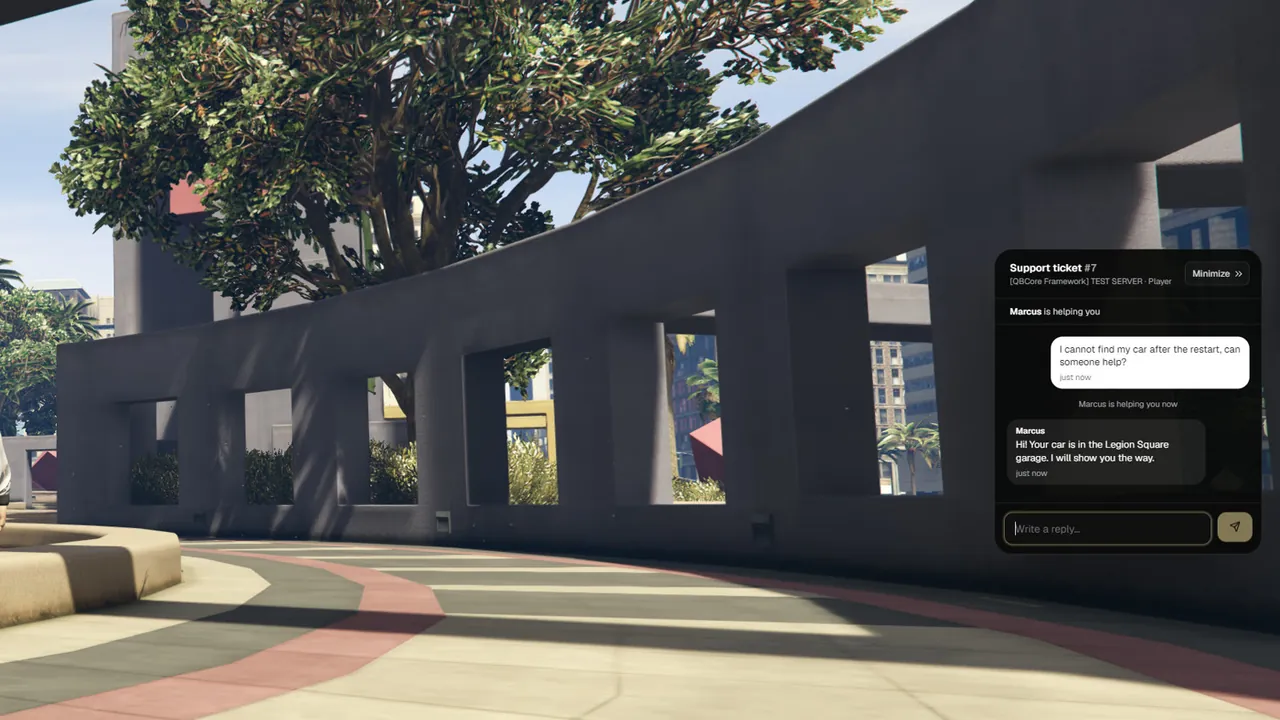
After /report a small tab appears on the right edge of the screen: My Ticket [F10].
Press the ticket key (F10 by default) or type /ticket to open the chat.
| Part of the window | What it shows |
|---|---|
| Title | "Support ticket #12", the name of the server and the category |
| Status line | "Waiting for a staff member…", later <staff name> is helping you |
| Conversation | Your messages, the answers of the staff member with their name, and short event lines |
| Reply box | "Write a reply…". Press Enter to send |
| Minimize | Puts the chat away so you can keep playing |
The event lines a player can see:
| Line | Meaning |
|---|---|
<staff name> is helping you now | A staff member claimed the ticket, or took it over |
| "Your ticket is waiting for a staff member again" | The staff member gave the ticket back, or left the server and did not come back in time |
| "Your ticket was closed" | The ticket is resolved |
Minimize and bring it back
- Minimize or Escape slides the chat to the edge. The tab My Ticket [F10] stays.
- The ticket key or
/ticketbrings the chat back. - When staff answer while the chat is put away, the tab shows the number of new messages.
- After a relog or a reconnect, an open ticket shows its tab again.
/ticketwith no open ticket says:You have no open ticket. Use /report <message> to ask staff for help.
When the ticket closes
Only staff close a ticket, by resolving it. The player then reads "This ticket is closed." and
"Need more help? Type /report and your message in the chat." in the window. If the chat was put away,
the tab disappears and a notice says Your ticket #12 was closed.
A closed ticket cannot be opened again. A new /report starts a new ticket.
For staff
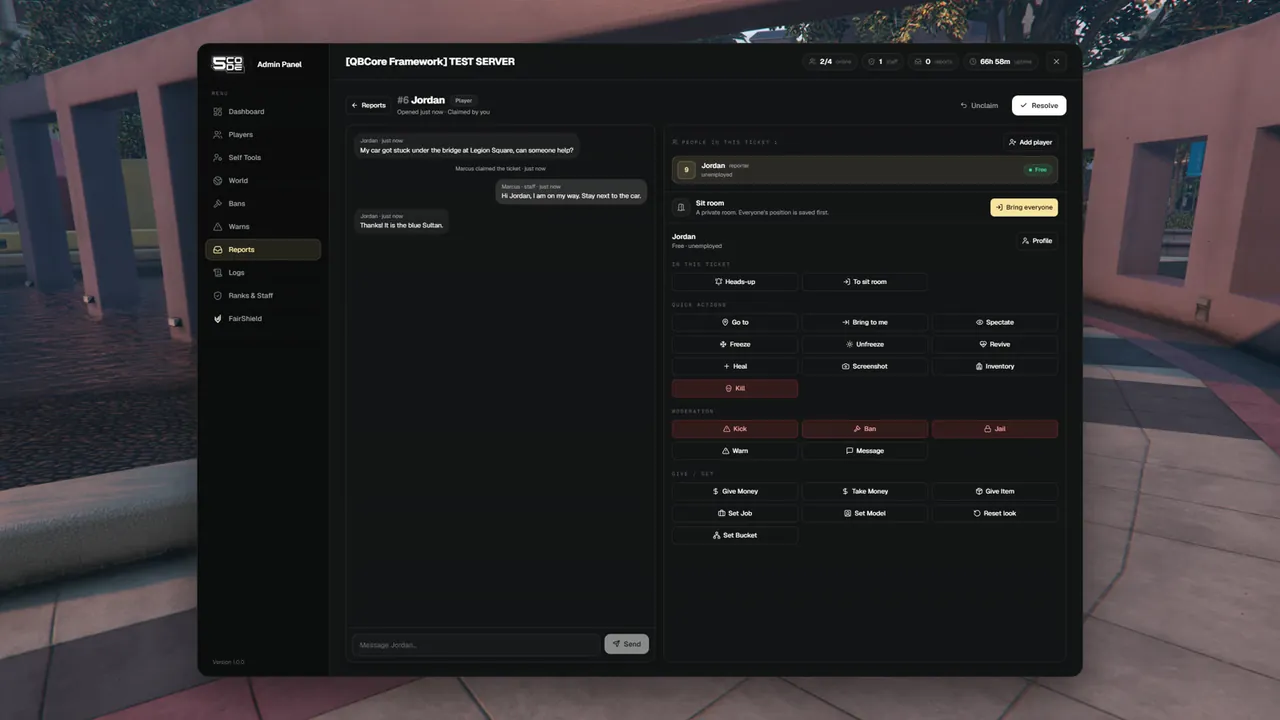
When a ticket comes in
- Staff who may see tickets get the notice
New ticket #12 from <player name>. - The top bar of the panel counts the tickets that are not resolved yet, next to the word reports.
- The quick menu shows "3 tickets waiting" and a Take next button. It gives you the oldest waiting ticket.
The Reports page
Open Reports in the menu. The Active view is a board with up to three columns.
| Column | What is in it |
|---|---|
| Open | Tickets nobody has claimed. Each card has a Claim button |
| Claimed | Tickets another staff member is handling, with their name |
| My claims | The tickets you are handling. Only for staff who may handle tickets |
Each card shows the ticket number, the player (with a green dot when online), how old it is, the start of the message and the category. A card can also show sit running and 2 new (new messages from the player).
Switch to Resolved to read closed tickets. Click any card to open the ticket.
Handle a ticket
| Button | What happens | Who sees what |
|---|---|---|
| Claim | The ticket becomes yours. Only one staff member gets it | Player: <your name> is helping you now |
| Send (reply box) | Your message goes into the player's ticket window | The player sees it in the chat |
| Unclaim | The ticket goes back to Open so another staff member can claim it | Player: "Your ticket is waiting for a staff member again" |
| Take over | You take the ticket from the staff member who holds it. Needs a higher rank than theirs | They read Ticket #12 was taken over by <your name>. Player: <your name> is helping you now |
| Resolve | The ticket is closed for the player. It cannot be reopened | Player: "Your ticket was closed" |
When the player writes in a ticket you hold, the line shows up at once and you get the notice New message in ticket #12.
When the staff member leaves the server
A claimed ticket waits 5 minutes for its staff member, so a crash or a quick relog does not lose it.
| What happens | Result |
|---|---|
| The staff member is back within 5 minutes | The ticket stays theirs |
| They are still away after 5 minutes | Every ticket they hold goes back to Open. Any staff member who may handle tickets can claim it |
| What staff read in the ticket | <name> left the server: the ticket is waiting again |
| What the player reads | "Your ticket is waiting for a staff member again" |
| The server or the resource restarts | The 5 minutes start again for every staff member who holds a ticket and is not online |
| A sit was running | It ends the moment its staff member leaves. See Sits |
In the Logs this is an /unclaim line by Console, with "staff member left".
The people on a ticket
The right side lists People in this ticket. The first one is the player who opened it (reporter). You can add more players, for example the person the report is about.
- Press Add player.
- Search by name. The list shows every online player with their job and what they are doing right now.
- Press Add. The player is on the ticket as added.
Adding does not move the player and does not tell them anything. Only the reporter has the ticket chat. Press Remove on an added player to take them off the ticket again.
Each person has a badge that says what they are doing:
| Badge | Meaning |
|---|---|
| Free | On foot, nothing special |
| Driving / In a vehicle | Driver or passenger |
| Handcuffed | Cuffed (QBCore and Qbox) |
| Dead or downed | Dead or in last stand |
| In jail | In the admin jail or the police prison. See Jail |
In a sit (ticket #7) | In the sit of another ticket |
| In the room | In the sit room of this ticket |
| Offline | Not on the server |
Click a person to act on them. You get Profile, the ticket tools (Heads-up, To sit room, Remove) and the normal player actions such as Go to, Freeze, Warn or Kick. The actions unlock once you are handling the ticket. The sit tools are explained on Sits.
Rules
| Rule | What staff read |
|---|---|
| Only an open ticket can be claimed, by one staff member | "Someone already claimed this ticket." |
| Only the staff member who holds the ticket can reply, unclaim, resolve and act on its people | "Only the staff member handling this ticket can do that." |
| Take over needs a higher rank than the holder. A super-admin always can | "That player has the same or a higher rank than you." |
| While a sit runs, the ticket cannot be unclaimed, taken over or resolved | "End the sit first." |
| A resolved ticket is read-only | "This ticket is already resolved." |
| You cannot add yourself | "You cannot add yourself." |
| A player is on a ticket only once | "That player is already on this ticket." |
| You cannot add a player with the same or a higher rank | "That player has the same or a higher rank than you." |
| A player in the sit room cannot be removed | "That player is in the sit room. Send them back first." |
| The reporter cannot be removed | The Remove button is only on added players |
Staff who can read but not handle a ticket see one of these under the conversation:
- "Your rank can read tickets but not handle them."
- "Claim this ticket to reply and use the sit tools."
- "Read-only — another staff member is handling this ticket."
- "This ticket is resolved. The conversation is read-only."
Permissions
| Name in the rank editor | Key | Needed for |
|---|---|---|
| See tickets | reports.view | The Reports page, reading tickets, the notice for a new ticket |
| Handle tickets | reports.manage | Claim, reply, unclaim, take over, resolve, Take next |
| Run sits | reports.sit | Add player, Remove, Heads-up and the sit room |
| Private message | player.dm | The Heads-up button |
The player actions on a person need their own permissions, the same as on the Players page. See Player Actions.
Settings
| Key | Default | What it changes |
|---|---|---|
Config.ReportCommand | 'report' | The command a player uses to write a ticket |
Config.TicketCommand | 'ticket' | The command that brings the ticket chat back |
Config.TicketKey | 'F10' | The first default key for the ticket chat. '' = no key, the command still works |
All three are explained on Tickets & Sits. All commands are listed on Commands.
Limits
- One open ticket per player.
- A resolved ticket cannot be reopened.
- A ticket stays with the staff member who claimed it while they are on the server. Only a higher rank or a super-admin can take it over. It is freed by itself 5 minutes after they left the server.
- The 5 minutes are fixed. There is no setting for them.
- A player cannot close their own ticket.
/reportdoes not ask for a category. Every ticket is filed as Player.- A reply in the ticket window can be 500 characters long, a
/reporttext and a staff reply 1000. - The board shows up to 100 tickets, the unresolved ones first.
- The ticket chat is never drawn over an open staff panel. It comes back as a tab when the panel closes.